
Generating Accruals
When you generate accruals, the system applies ancillary data to calculate accrued times for the period, divisions, and accrual types that you specify.
-
Open the Accruals Generation screen.
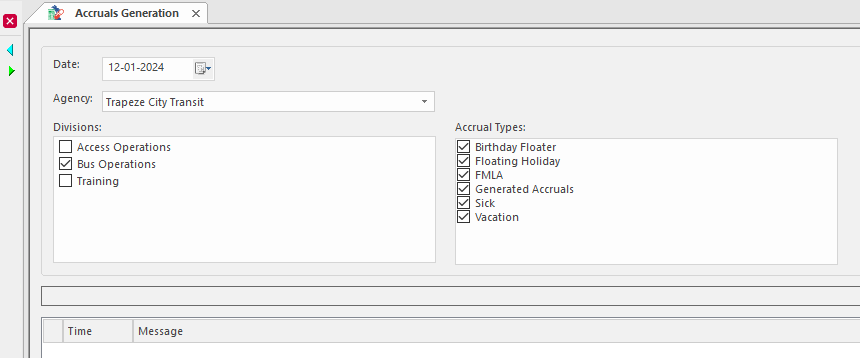
- Select a Date that falls within the accrual period for which you want to generate accruals.
- Select the Agency for which you are generating accruals.
- Select the Divisions for which you want to generate accruals.
- Select the Accrual Types you want to generate.
-
Select Generate Accruals:
 The OPS Validation dialog appears.
 -
Do one of the following:
-
If one or more error messages appear in the dialog, select OK, and then make the required corrections before trying to generate the accruals. Error messages have red icons in the Type column.
-
If only confirmation or warning messages appear in the dialog, select Retry All and then OK. Confirmation messages have yellow icons in the Type column.
-
If the accrual generation includes year end processing, but the next accrual year has not yet been created, the process information indicates why the accrual generation failed.