
Creating Allowance Claims on Smaller Screens
Allowances are subsidies your transit agency grants its employees. For example, money for uniforms.
-
Select menu (
 ), then Allowances.
Current allowance balances appear at the top of the page.
), then Allowances.
Current allowance balances appear at the top of the page. - Optional:
View previously created records:
-
Expand (
 ) allowance claim cards for more information.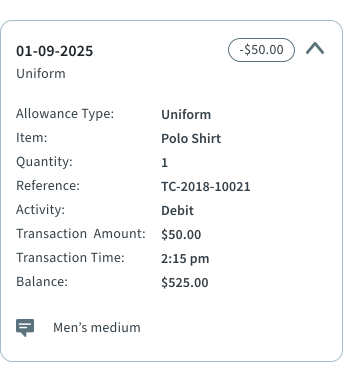
A Credit is an Activity amount provided to you and a Debit is an activity amounts that you have claimed. The Adjust activity resets the value of the allowance. For example, if you are given a $500 allowance for tools every year and you have $100 left to use on December 31st, then on January 1st you could see an Adjust amount for $500 and a Tools balance of $500 (not $600).
-
Expand (
- Select +Claim Allowance.
-
Select an Allowance Type.
Changing the allowance type may show new fields that need to be completed. For example, Item and Quantity.
- Optional:
Enter the Reference.
For example, an invoice or record number used by your agency. See your system administrator for more information.
-
Enter the Transaction Amount.
If the transaction amount is predefined, it can't be edited. Amounts that exceed your account balance can only be added by system administrators.
- Optional: Enter any Comments.
- Select Submit Claim.