Place text in quotation marks for exact match search results.
About the Remarks Manager
The Remarks Manager creates and maintains dynamic announcements
that are played in various sections of the call flow.
Remarks are most often used to play Opening Bulletins or General Announcements to customers
and often cover a variety of topics such as weather updates, service disruptions, and fare
changes.
Opening Bulletin is played to every caller near the very start of
the call flow (often after language selection in INFO-IVR and before client login in
PASS-IVR).
General Announcements are played when the caller chooses to
listen to the General Information section of the call flow (often by choosing the
corresponding menu option from the main menu).
To access the Remarks Manager, open a web browser (for example,
Microsoft Internet Explorer) and type the following address into the address bar:
http://server:port/hiwire?.=aRemarksHome
Note: Replace "server" with the IP address or host name of the IVR application server and
replace "port" with the port number on which the service is running.
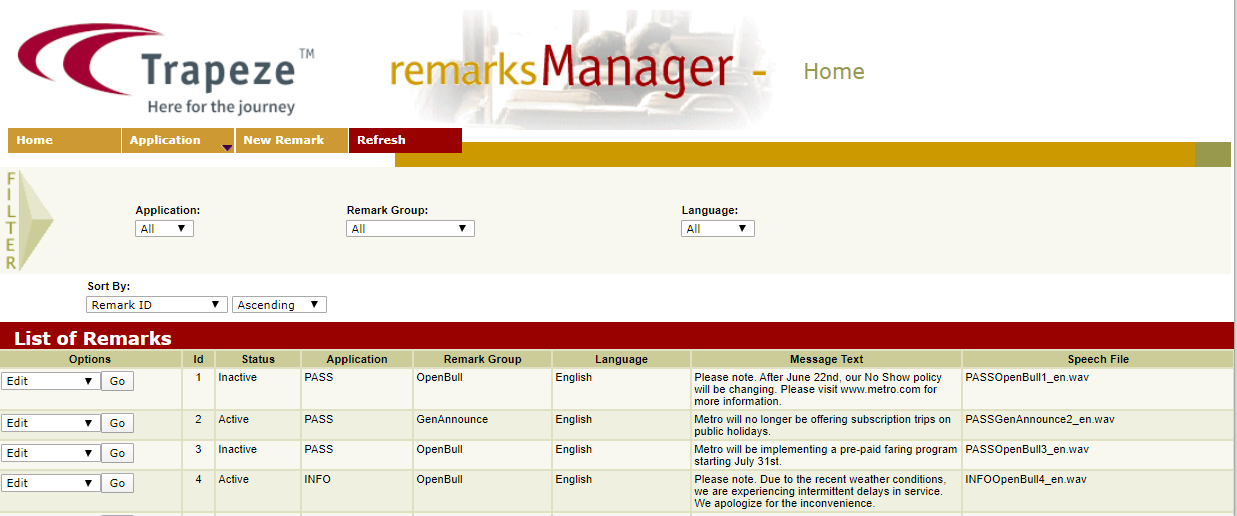
The List of Remarks grid shows all the Remarks that currently exist in
the database. Depending on your setup, you may see remarks for both INFO-IVR and PASS-IVR as
well as the remarks for all Remark Groups and Languages.
Most screens of IVR services show a Filter pane. You can select
criteria from the various fields to view content that you want.
The remarks that are shown in the list of remarks grid match the selected filters in the
filter pane.