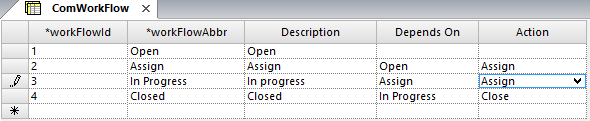
ComWorkFlow refers to workflows, which are sets of tasks or actions performed by various employees at the transit site in order to resolve an issue or respond to feedback.
-
Click .
-
Click the Add New button:

-
In the WorkFlowId field of the new row, type a number to identify the new workflow.
-
In the WorkFlowAbbr, type an abbreviation of the name of the new workflow.
-
In the Description field, type a brief description of the new workflow.
-
In the Depends On field, type a workflow that must be previously
applied before the new workflow can be applied.
You cannot choose more than one option nor can you duplicate an option in this field.
For example, the workflow In Progress only shows Assign in the Depends
On field. (The feedback must have been assigned before you can view the work
in progress on it.) Create the workflows in sequence in order for the process to be
performed.
-
In the Action drop-down list, choose an
action that is applicable to the workflow.
-
Click the Save button:

A number is automatically generated for the new record in the
WorkFlowId field.