Adding Trapeze Applications

If your transit site uses other Trapeze applications, you can list them in the Trapeze Applications ancillary data screen.

  1. Click Ancillary > Trapeze Applications.
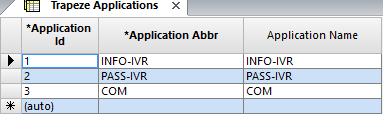
    Sample Trapeze Applications screen
  2. On the screen toolbar, click the Add New button:Add New button
  3. In the Application Abbr field of the new row, type an abbreviation for the Trapeze application.
  4. In the Application Name field, type the full name of the application.
  5. Click the Save button: Save button
A number is automatically generated for the new record in the Application Id field.