
Reviewing Completed Messages
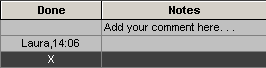
Completed messages can be reviewed to determine who marked the message as done and when it was marked as done.
Before you begin
About this task
Procedure
-
Click .
Done messages are hidden. A check mark shows beside the Hide Done command in the Centre menu.
-
Click .
Done messages are visible and show the user name and time associated with the Toggle Done command. The check mark is cleared from beside the Hide Done command in the Centre menu.