
Selecting Runs for Batch Jobs
You can select runs to reschedule trips that are scheduled on specific runs.
Before you begin
A Batch job type must be selected and parameter data should be defined. The New Batch dialog box should be open to the Parameters tab.
About this task
Procedure
-
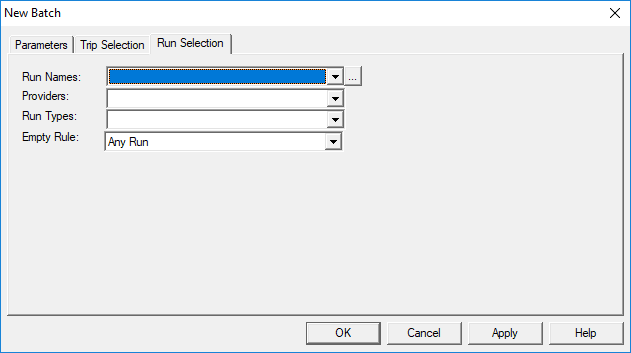
Click the Run Selection tab.
Run Selection information appears.
-
In the Run Names field, do one of the following:
- In the Run Names list, select the runs to be included in the batch job. If no selection is made, all runs are included in the run subset.
- Click the ellipsis button. The Select Runs dialog box appears. Use this feature to search for runs by capacity type, provider, or run group.
- If you did not select providers from Select Runs, then in the Providers list, select the providers. Only runs operated by the selected providers are included in the batch job. If no selection is made, runs for all providers are included.
- In the Run Types field, select the run types to be included in the batch job.
-
In the Empty Rule list, click one of the following:
- Any Run
- Runs with and without trips already scheduled to them.
- Empty Runs
- Only runs that have no trips scheduled to them.
- Non-Empty Runs
- Only runs with trips already scheduled to them.
- Click Apply.
- Click OK.