
Changing Booking Subtype
The Schedule Booking Wizard allows you to change the booking subtype of a booking before looking for solutions.
Before you begin
Procedure
-
Locate the booking subtype filter.
In the Schedule Booking Wizard, the booking subtype for the booking is found under the Pickup and DropOff filters:
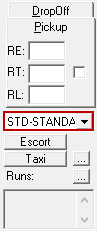
- Click a different subtype in the list.
-
To save the new subtype and find solutions for the booking, click the Find
Solutions button:
