
About Changing Requested Times for a Booking
You can change requested pick-up/drop-off times in the Schedule Booking Wizard without editing the booking in Trip Booking. The Schedule Booking Wizard can then show solutions for the new requested trip time.
If you change the requested time for a booking and then save a solution, the system saves the new requested time in the booking record. If you exit from the Schedule Booking Wizard without saving a solution, the system does not change the requested time in the booking.
To change requested times for a booking, type the times in the Pickup
and DropOff tabs on the left side of the Schedule Booking Wizard.
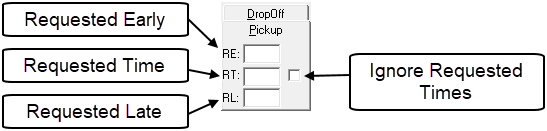
Beside the fields is a check box. If it is selected, any times entered in the Pickup or DropOff fields will be ignored, and the system will display all available solutions for the selected day.