
About Pick-Up Time Calculations using Drop-Off Logic
Because an accurate pick-up time is crucial to getting clients to their destinations in a timely manner, Drop-Off Logic uses a formula that takes real traffic factors, such as average speed and time of day, into consideration.
Pick-Up Time Calculations
- The origin and destination addresses must be geocoded.
- The Req time must be defined and then the Req check box selected (if it is not automatically selected).
- The Save button must be clicked.
- After saving, the early time (ET) and late time (LT) for the destination are updated, and the origin Req time is updated.
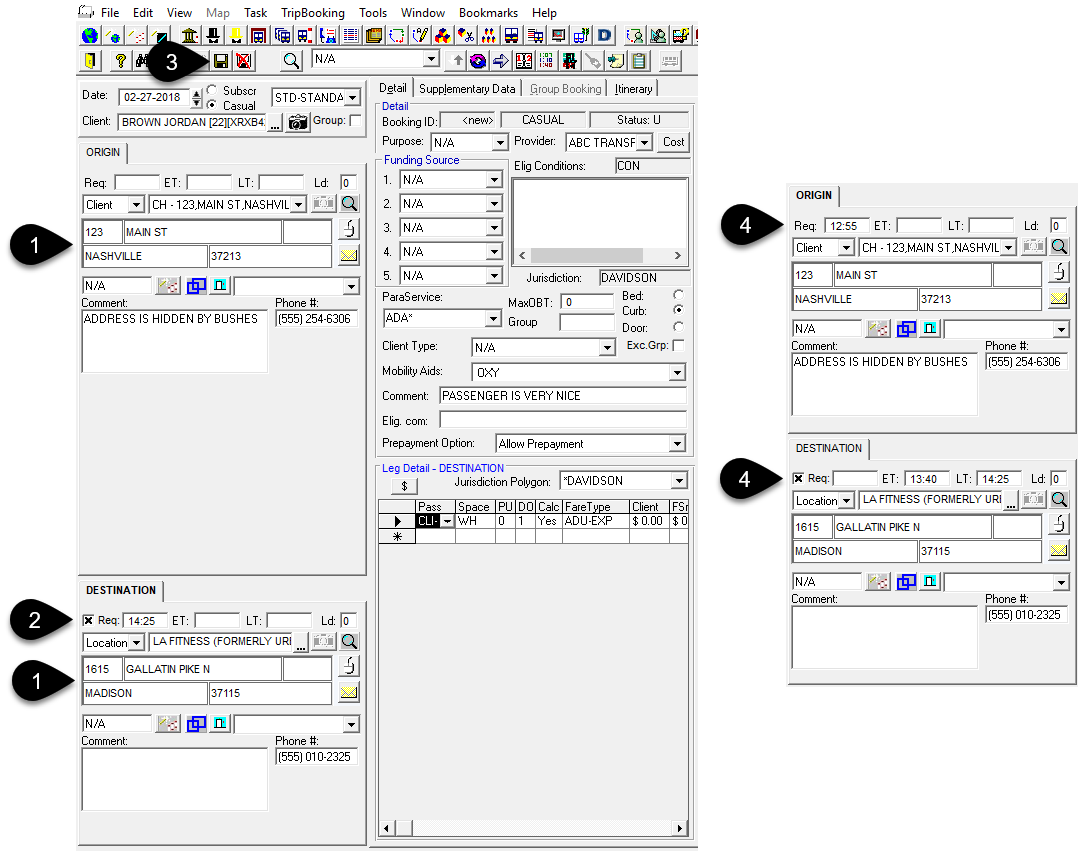
The following explanation describes how pick-up time is arrived at using Drop-Off Logic:
- The travel time is first calculated:
Travel time = Distance (in kilometers) × 60 ÷ Speed (km/hour)
The speed value is adjusted depending on factors such as the time of day, or direction in which you are traveling.
- Travel time is then multiplied by the Request DropOff Adjustment, which is defined in
the Schedule Administrator.
Travel Time = Travel Time + (Travel Time × ReqDOAdj)
where ReqDOAdj is a value between 0 and 1.
- The travel time is checked not to be greater than the Maximum Requested Drop Off
Adjustment (MaxReqDOAdj).
If the travel time is greater than the MaxReqDOAdj value then:
TravelTime = MaxReqDOAdj
- The Request Pickup time is calculated:
ReqPickUp = ReqDropOff − TravelTime
- If the Requested Drop Off Early Time Adjustment (ReqDOEtAdj)
value is greater than zero, the ET time (earliest time) for the DropOff is
calculated:
EarlyTimeDropOff = ReqDropOff − ReqDOEtAdj
The LT time (latest time) for drop-off becomes the value entered initially as the Requested DropOff time.