
About Choosing Client Eligibility Rules in Trip Booking
Rules about eligibility conditions can be specifically defined for each client.
Eligibility conditions, and the rules applied to eligibility conditions, are specified in individual client records (found in ).
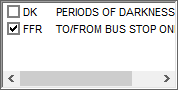
Only one default eligibility condition can be assigned to a client. The Elig Conditions field allows the call taker to select which condition applies to the trip being booked.
When an eligibility condition is in effect, the client rules applied to it determine the selections made in Trip Booking. If the defined rules detail requirements that are not defined in the client record, the requirements do not automatically populate.
For example, a booking is created for a client who has two eligibility conditions valid for the date of the booking (DK and FFR). The default eligibility condition in the client record is FFR. When a booking is created, the travel parameters (that is, the eligibility rules) associated with the condition are automatically populated for the trip. For example, funding sources, mobility aids, and fare type.
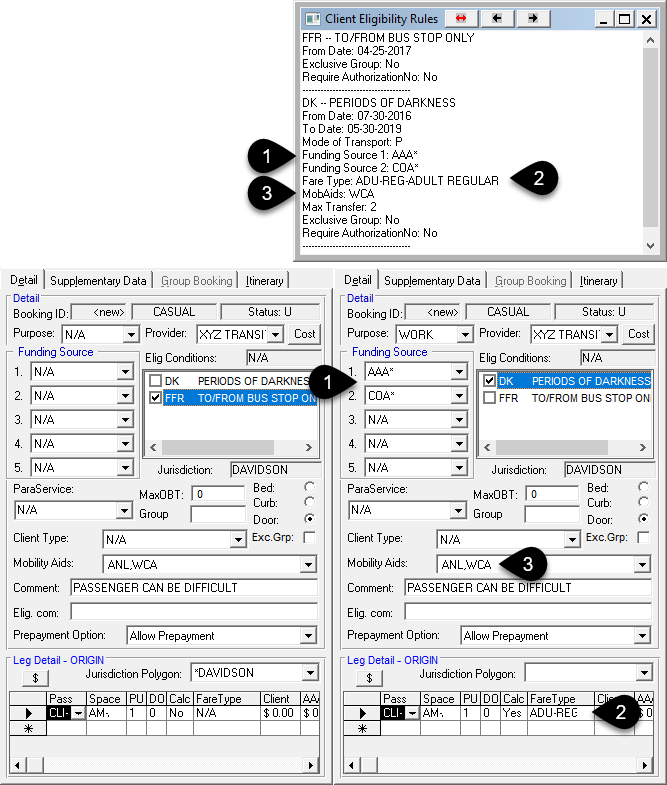
- 1
- Funding sources rule defined for the DK eligibility condition for the selected client.
- 2
- Fare type rule defined for the DK eligibility condition for the selected client.
- 3
- Mobility aid rule defined for the DK eligibility condition for the selected client.