
Overriding Eligibility Rules in Trip Booking

When an eligibility condition is used in a booking, selections in Trip Booking are predetermined but you can edit individual fields.

Before you begin

A system administrator must set the system to enforce eligibility rules. This is done in Tools > System Properties, on the Profile tab, under PASS Booking Client > Enforce Client Eligibility Rules. Setting this property to Yes allows the system to check that a booking complies with all eligibility rules (travel parameters) before it is saved.

Users who are able to override eligibility rules in Trip Booking must be granted the following security permission in the Trapeze6 Client Shell: Trapeze4 > Trip Booking > Client Eligibility Rules.

Trip Booking must be open.

Procedure

  1. Create and save a booking.
    A message appears showing where discrepancies between the eligibility condition rules and the booking exist.
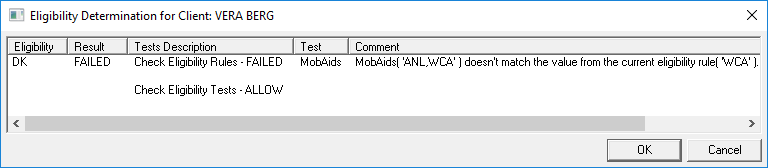
    The Eligibility Determination for Client dialog box shows client Vera Berg and the results of her failed MobAids test.
  2. Click OK.
    The eligibility rules are overridden.

Results

When the booking is saved despite eligibility rule violations, a PASS/OVERRIDERRULES action entry is made in Tracker Action Browser (if this option is enabled). If you do not see a Tracker Action Browser entry, contact a system administrator. They may need to update Tracker Actions ancillary data.