
About the Set Time Dialog Box
The Set Time dialog box is used when arriving or performing events and for some types of cancellations.
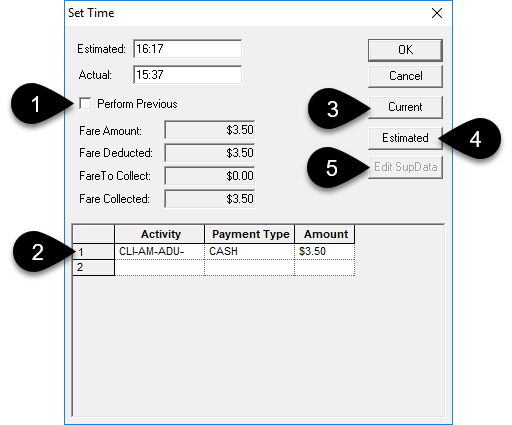
- 1
- Select Perform Previous to mark all previous unperformed events as performed.
- 2
- Enter the Fare Collected information by specifying each Payment Type and Amount applied to an Activity.
- 3
- Click Current to update the Actual time with the current time on your computer.
- 4
- Click Estimated to update the Actual time with the time in the Estimated field.
- 5
- Edit SupData is not available when arriving or performing events.
When using the Set Time dialog box for cancellations (Cancel at Door, No Show, or Missed Trip), click Edit SupData to open the Edit Supplementary Data - Booking dialog box for the original booking.