
Changing the Order of Menus and Screens
Change the order of screens in menus as needed.
Procedure
-
At the bottom right of any screen click the customize menu button:

The Links - workspace/main dialog box appears.The Available Links pane on the left contains all available menus and menu items. The Current Links for pane on the right contains all menus and menu items that are available for users in the current user group. Menu names appear in bold text.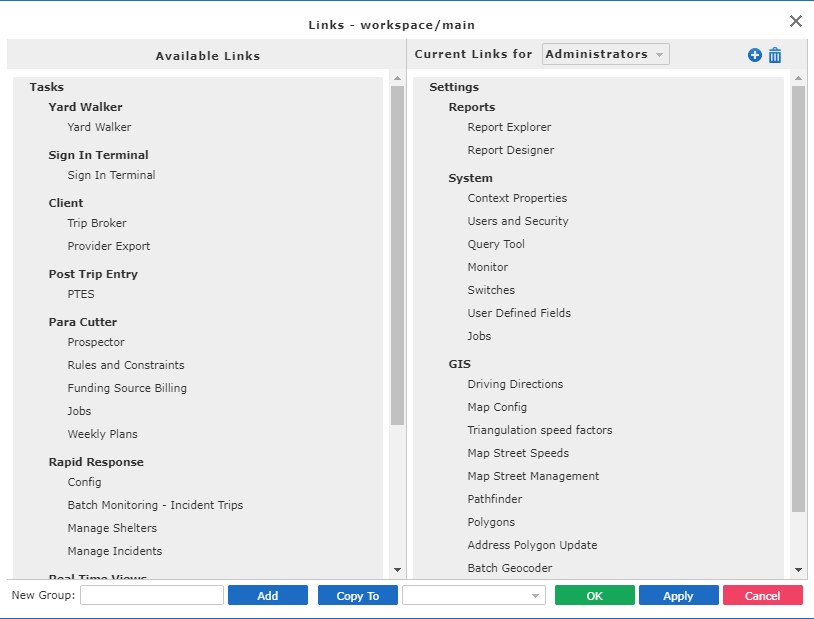
-
Perform the following steps as needed:
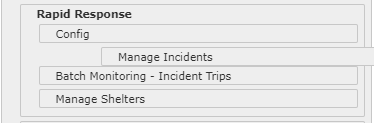
- To move one menu or menu group, drag and drop it to the new location in the list. When a
menu or menu group is clicked and dragged, it will show the actual item being dragged to
a new location on the list.
-
You can move menu items from one menu to another.
- To move one menu or menu group, drag and drop it to the new location in the list. When a
menu or menu group is clicked and dragged, it will show the actual item being dragged to
a new location on the list.