
Customizing the Reports Screen
You can customize the Report Explorer screen by creating group-specific screen configurations, changing the order of reports, copying screen configurations to other groups, or adding report group titles.
- Click .
-
On the screen toolbar, click the Edit Links button:
 The Links - Report Explorer window appears.
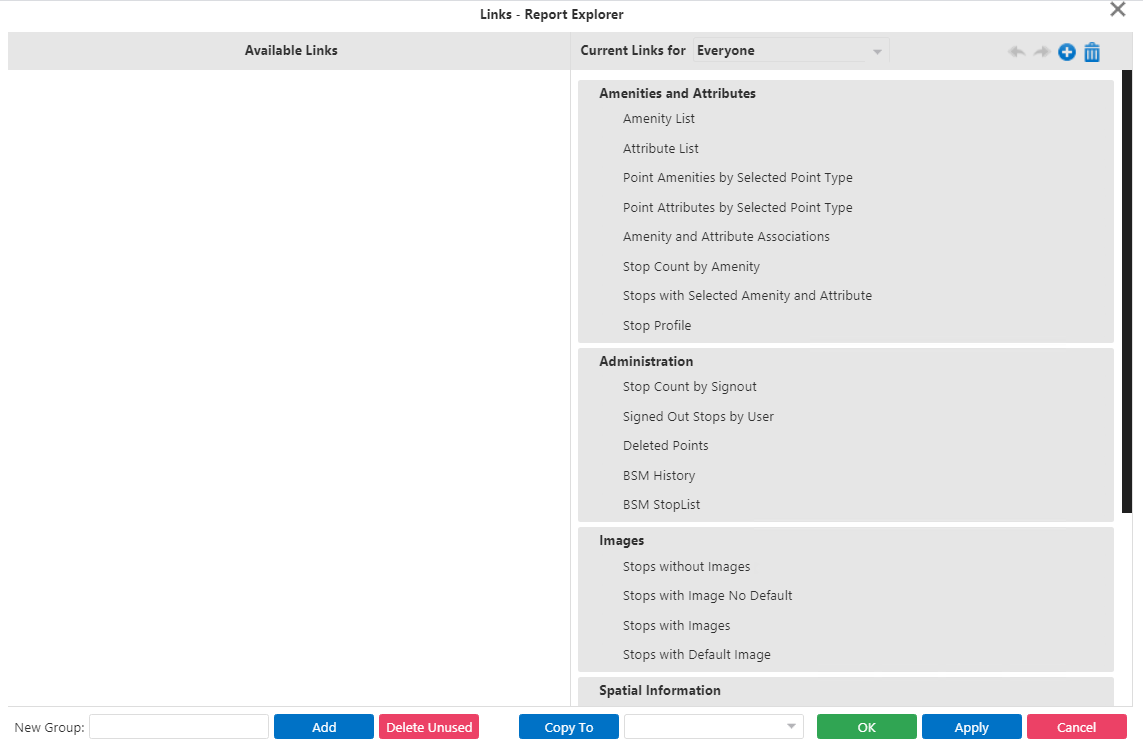 The Current Links For pane contains all reports and report group titles that appear for users in the selected user group. Report group titles appear in bold text. The Available Links pane appears blank in the graphic, however, it typically contains all available reports and report group titles.Note: If new reports are added after the report links are already established for any group, they are added by default to the bottom of the list for every group with report links. Check the groups after entering new reports.
 -
Perform the following steps as appropriate:
-
Add or remove reports or report groups for specific users.
- Change the order of reports and report groups.
- Copy a Report screen configuration to other user groups.
-
- Optional: To apply your selections to another user group, select the group in the Copy To drop-down list.
- Click OK.