
Navigating in the Workspace
To help you navigate efficiently in a screen, you can right-click on either the vertical or horizontal scroll bar.
Depending on the scroll bar you click, one of the following menus appears:
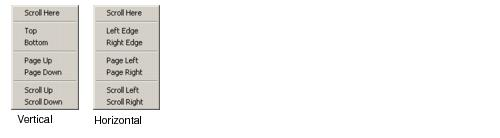
The following table explains the options in the menus.
| Task | Description |
|---|---|
| Scroll Here | Scrolls to the place you clicked with the mouse. |
| Top | Scrolls to the top of the available view. |
| Bottom | Scrolls to the bottom of the available view. |
| Page Up | Scrolls up one page. |
| Page Down | Scrolls down one page. |
| Scroll Up | Moves the view the equivalent of one drag box higher. |
| Scroll Down | Moves the view the equivalent of one drag box lower. |
| Left Edge | Scrolls to the far left. |
| Right Edge | Scrolls to the far right. |
| Page Left | Moves the equivalent of one page to the left. |
| Page Right | Moves the equivalent of one page to the right. |
| Scroll Left | Moves the view the equivalent of one drag box to the left. |
| Scroll Right | Moves the view the equivalent of one drag box to the right. |