
Loading Travels
After the waits have been defined, load them to the Travels grid.
-
In the Waits and Travels dialog box, click
Load.
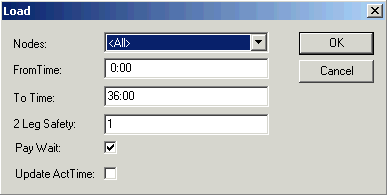 The Load dialog box appears.
 -
From the Nodes list, select the wait and travel you want to
load.
To select all waits and travels, select All.The menu displays all the existing waits and travels between the selected node pair in the Waits and Travels dialog box.
-
In the From Time and To Time fields, type
the applicable time interval when the selected wait and travel applies.
These fields are set at 0:00 and 36:00, respectively, by default.
- Optional:
In the 2-Leg Safety field, change the value of 1 set by default
with a time (in minutes) to allow an operator to catch the second bus of a two-leg
travel.
Change the value set by default to 0 if based on field data, the operator has enough time to catch the second bus.
-
To load the wait travels in the Paid column, select the
Pay Wait check box which is used to indicate that the transit
site pays for wait time.
If selected, Yes appears as the default in the Paid column of the Travels grid.
-
To update the actual times, select the Update Act Time check
box.
The system updates the Actual times of the wait and travel to match the Paid time. If you do not select this check box, the Actual Times column shows the value of zero (0).
-
Click OK.
A message box informs you of the number of travels that have been created. If you selected a wait and travel, all the other waits and travels for the selected node pair are removed and regenerated.
- Click OK.
After loading, the Wait and Travel records appears in the grid with time ranges representing arrival times at the Off stop if the travel is from garage to a node (relief node) or representing departure times from the On stop if the travel is from Node to a Garage. If you are creating node to node travels with waits, then you must use the Waits and Travel property to tell the system to use the From or To methods, that is, From indicates that the travel is at the end of a piece (default) and the To indicates that the travel is at the beginning of a piece.