
Calculating Node to Node Run Times
The following procedure is used to calculate the run times for node to node pairs that do not have run times.
- On the Node to Node tab, select the Missing Times check box.
-
Click Display.
The node to node pairs that do not have run times appear in the data table. The Times column shows no values.
- On the Node to Node tab, select the node to node pairs for which you want run times.
-
Click the Edit button:
 The Edit dialog box appears.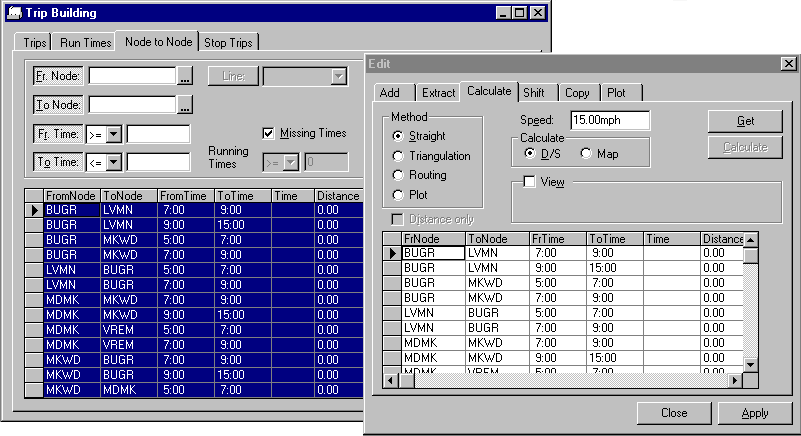
- On the Calculate tab, click Get. The selected records from the Node to Node tab appear in the grid on the Calculate tab.
- From the list of node to node pairs on the Calculate tab, select a node.
- In the Method frame, click the method of determining the distance between nodes you want: Straight, Triangulation Routing, or Plot.
-
In the Calculate frame, select the basis for calculating the run
time: D/S or Map.
If you clicked the Map option, the Distance only check box is activated. If selected, the system provides distance without the time information.
- In the Speed field, type the average speed a vehicle would normally travel from one node to the other node based on your field data.
-
To calculate run times using geocoded data, select the View
check box.
In the View frame, Save, Skip, Turnlist, and Save Trace are activated.
-
Click Calculate.
The results appear in the Time and Distance columns in the grid on the Calculate tab. The Calculate button changes to a Stop Calc button. When Stop Calc is clicked, the calculation is stopped.
If you clicked Stop Calc, Save and Skip in the View frame are made inactive and Turnlist is activated.
-
To use the calculated run time and distance data, click
Save.
Alternatively, if you do not wish to use the calculated results, click Skip. The system restores the previous data.
- Optional:
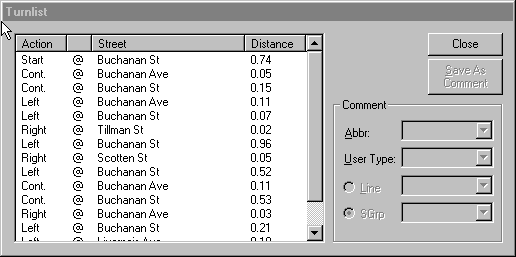
To view the turn list, click Turnlist.
The Turnlist dialog box appears.
- Click Apply. The data from the Calculate tab appears in the Node to Node grid.
- Click Close.