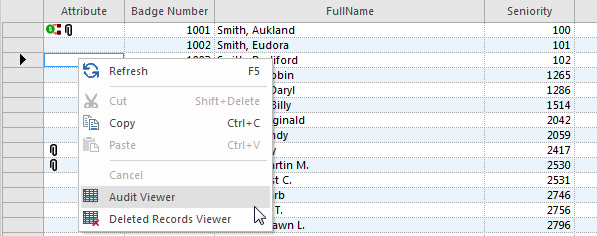
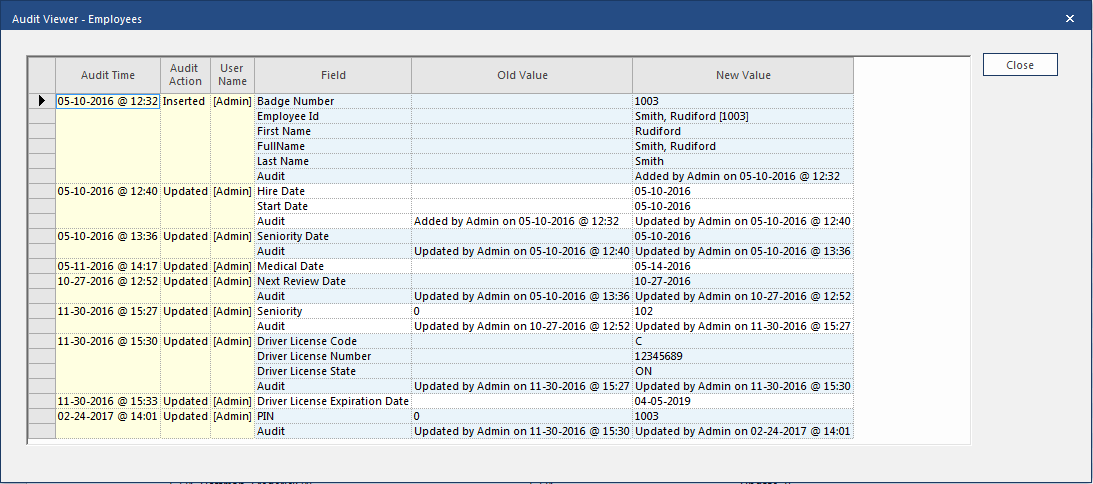
The Audit Viewer screen shows all the changes made to a
record.
To view audit history, use grid view. Select a record, then right-click and select
Audit Viewer.
The Audit Viewer screen shows all changes made to the record from
the time it was initially created to now.
Note: Some or all audit information may not be
available if the record was created before the audit feature was available or if audit
records were deleted.
Note: If a specific
absence is selected, only the details for that absence are shown.
Table 1. Audit Viewer Column Descriptions
Column
Description
Audit Time
Date and time the record was changed.
Records change every time you save
them. If you change multiple fields and save the change for each field
individually, you see multiple Audit Times.
Audit Action
Type of change made to the record:
Inserted. A new record was created.
Updated. Fields in an existing record were
changed.
User Name
Name of the user who performed the action.
Field
Name of the changed field. Fields are in alphabetical order, except for
Audit, which is listed last. Only updated fields are
listed.
Old Value
Value in the field before the change. For newly created records, this value
is blank.