
Defining Parking Grid Cell Attributes
Add information for specific parking grid cells. For example, allowed vehicle types, descriptions, pull-out sequences, and vehicle orientations.
- Open the Parking Grid Definition screen and set the Context (F3).
- Click in a cell.
-
Right-click and select Set Parking Grid
Attributes.
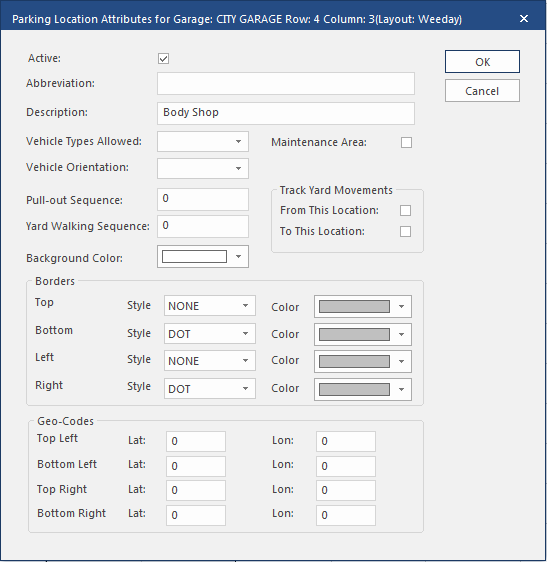
- Select Active to allow a vehicle to be assigned to this cell.
- Enter a Description for the cell.
- Select the Vehicle Types Allowed.
-
Select Maintenance Area to limit vehicles assigned to
the cell to those in for maintenance.
Assigning a vehicle to the cell that doesn't have a maintenance record for the current or next day or an open service request generates a prompt asking you to create a record or request.
- Select the Vehicle Orientation.
-
Enter the cell's position in the Pull-out
Sequence.
This value is considered during the automatic vehicle assignment process. Row and column numbers are secondary orders. You can't enter a Pull-out Sequence in a deactivated cell.
- Select a Background Color for the cell.
- Select From This Location to log movements from this cell.
- Select To This Location to log movements to this cell.
- Select the Border style and color for each side of the cell.
- In the Geo-Codes area enter the longitude and latitude of each cell corner.
- Select OK.