The financial penalties you impose depend on your transit site's policies and
agreements.
-
Click .
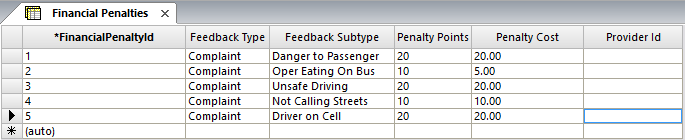
The
Financial Penalties screen appears.
-
Click the Add New button:

A new row is added in the grid.
-
In the Feedback Type drop-down list, select the appropriate
feedback type.
-
In the Feedback Subtype drop-down list, select the appropriate
feedback subtype.
-
To apply penalties to specific providers, perform the following steps:
-
In the Penalty Points field, type the value that applies to
the selected feedback type and feedback subtype.
-
In the Penalty Cost field, type the value that applies to the
selected feedback type and feedback subtype.
-
In the Provider Id drop-down list, select the provider or
agency to which the financial penalty applies.
The
Provider Id field is only displayed after you have added
it in the
Screen Information screen.
Note: If you do not select a
provider, the penalties are applied to all providers.
-
Click the Save button:
 .
.
