
Network Architecture Example
DriverMate communicates with your existing trapeze PASS or NOVUS installation using XGate communication gateway (previously MDC proxy) and Trapeze PASS-MON (MDT server).
Example system architecture for dual MDT type (DriverMate replacing existing MDT)
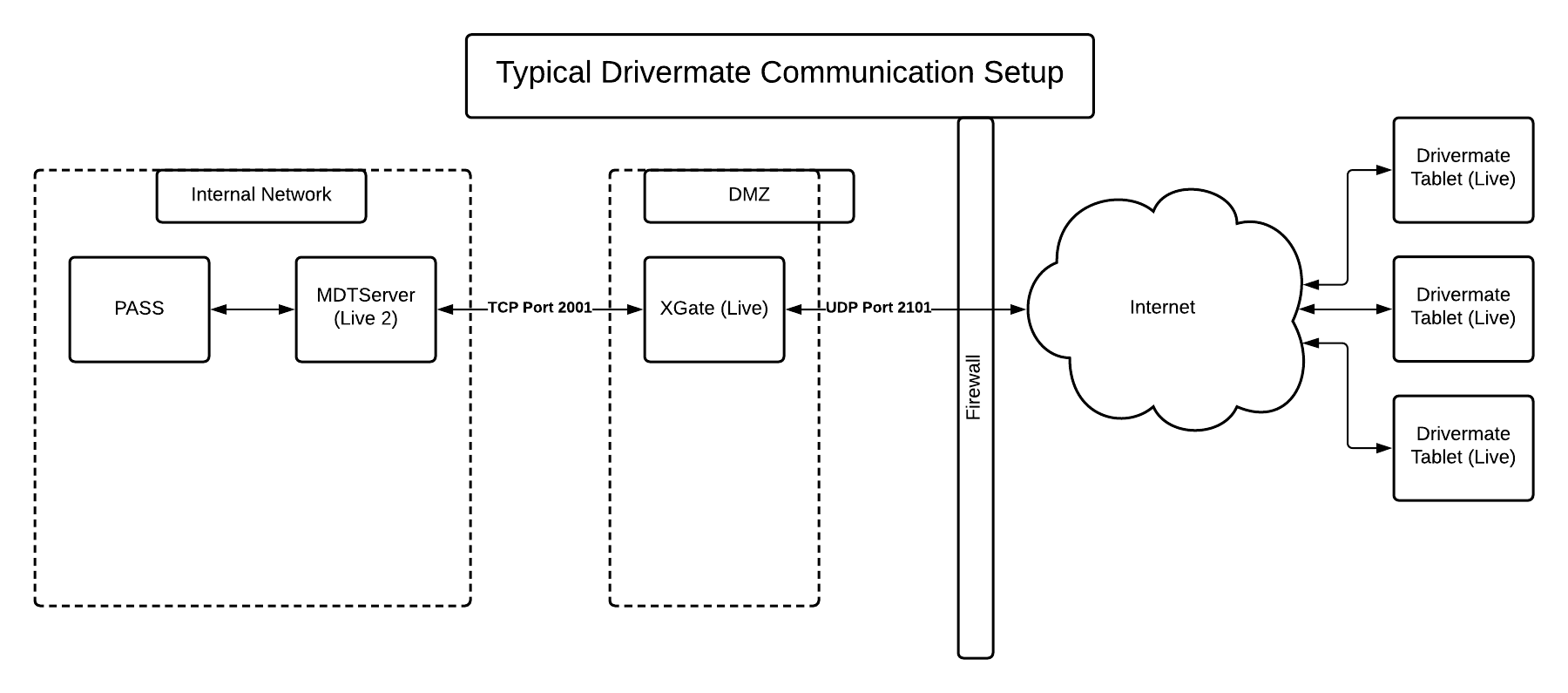
Because DriverMate communicates with the same dispatch systems as hard-mounted terminals, a transit agency can use both hard-mounted terminals and Android devices at the same time.
PASS-MON (MDT Server and AVL Agent)
The system enables the sending and receiving of information such as manifest events, latitude and longitude data from Global Positioning Systems (GPS) and Automatic Vehicle Location (AVL) systems, and text messages from and to mobile computers. With mobile computers, drivers can view manifests and perform the day’s trips. Trip data such as vehicle arrival and departure times are automatically transmitted back to the Dispatch center. As part of the Trapeze suite of integrated transit solutions, PASS-MON ensures that the incoming data is seamlessly and automatically collected into the same centralized database used by Trapeze PASS
XGate Communication Gateway
XGate is a middle ware product that allows back office software to communicate with in-vehicle devices, and offers the following key features:
- Confirmed, in-order delivery of messages
- Consistent host interface, regardless of the network being used
- Communication with multiple host applications simultaneously
- Units can communicate on multiple channels
- Messages are pushed, instead of polled
- Support for inbound/outbound message priority
- Comprehensive configuration and troubleshooting UI
The XGate software consists of the following components:
- XGate Service - communicates with hosts and units. This component is a Windows Service and is always running in the background on the XGate Server.
- XGate Gateway - handles requests from XGate Management Studio users and isolates the XGate service from having to deal directly with these requests. This component is a Windows Service and is always running in the background on the XGate Server.
- XGate Management Studio - a desktop Windows application that allows users to configure, monitor and troubleshoot their system. XGate Management Studio can be installed on any machine, as long as the machine can connect to the XGate Server on a TCP port.
XMM Device Management
XMM enables over-the-air distribution and remote installation of operating system updates on many Trapeze Mobile Devices in a fleet.
XMM can remotely monitor and troubleshoot each Mobile Device in a fleet, including:
- maintain an up-to-date hardware and software inventory, detailing all operating system and hardware versions
- display real-time Mobile Device activity logs
- download device activity logs
- generate and export data log reports
- enable remote device troubleshooting by providing a suite of diagnostic tools