
Defining Rate Profiles
Rate profiles are additional costing rules attached to trip costs and activity costs to define how costs are charged per flat rate, time, distance, or slack time.
Before you begin
About this task
In addition, time periods subject to different pricing rules can be defined. Periods may be defined as convenient (off-peak) or inconvenient (peak). Providers can then charge a higher rate during inconvenient (peak) periods throughout the day.
Limits for these rates are set in the Activity Cost and Trip Cost dialog boxes.
Procedure
- In the Contract frame, click the contract for which to define rate profiles.
- In the Validity frame, select a validity in the grid.
-
Click Edit.
The buttons in the Validity frame become available.
-
Click Rate profiles.
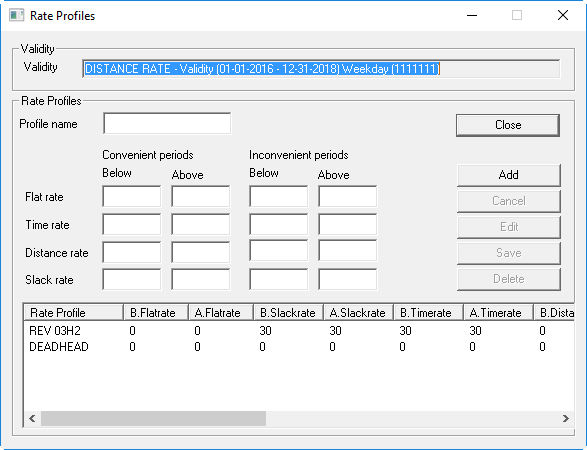
The Rate Profiles dialog box appears.
-
In the Rate Profile frame, type a name for the profile in the
Profile name field.
A profile name allows for the easy maintenance and easy attachment of the profile to other rules.
-
Define the following information as needed for convenient periods and inconvenient
periods:
- Flat rate
- Single rate to be charged if the trip distance is above or below the defined values in Trip Costs and Activity Costs.
- Time rate
- Rate to charge if the trip time is above or below the defined values in Trip Costs
and Activity Costs.
For example, if the Time limit defined in Trip Costs is set to 30 min, then the Below rate applies for periods of time under 30 minutes and the Above rate applies to periods of 30 minutes or more. If the rate Below value is set at -1, then nothing gets paid for the first 30 min.
- Distance rate
- Rate to charge if the trip distance is above or below the defined values in Trip Costs and Activity Costs.
- Slack rate
- Rate to charge if the distance traveled is above or below the defined values in Trip Costs and Activity Costs and there are no clients on board the vehicle.
- Click Add.