
Creating Provider Contracts
Provider costs are normally handled through contracts, which may be renegotiated or put into bid rounds at different intervals (for example, every two years).
Before you begin
About this task
Cost validities can be limited to specific time periods, which allows for the creation of future cost structures that include defined activation dates. For example, you may create one validity for weekend and statutory holidays, and another for holidays. Validity time periods are defined using week days and Valid from and Valid to dates.
Procedure
-
Click .
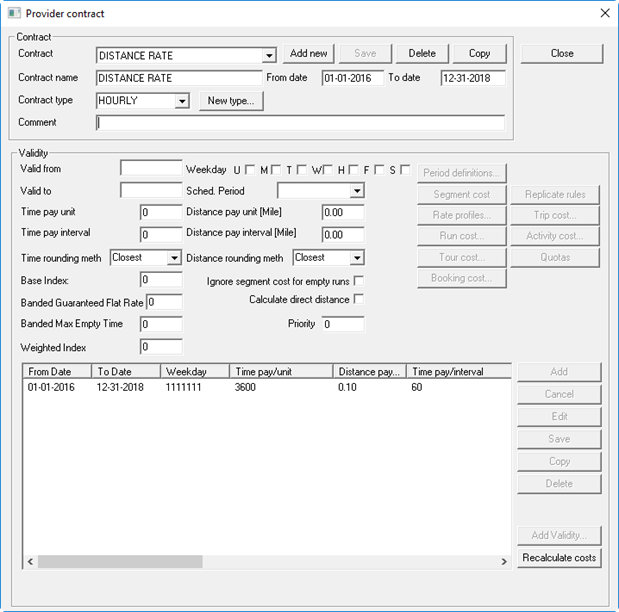
The Provider Contract dialog box appears.
-
Click the Add New button.
The label <New> appears in the Contract and Contract name fields.
-
In the Contract frame:
The contract is added to the list of provider contracts.
-
In the Validity frame, provide the following information:
- Valid from and Valid to
- Specify the date range during which the contract rules will be in effect. Note that there is a valid from/to range for the contract and also for the validity. When you are defining a multi-year contract, you can set up validities for the negotiated cost of each year of the contract.
- Weekday
- Select check boxes for each day of the week that the rules will be applied.
- Sched Period
- (Optional) Click the sign-up period.
- Time Pay Unit
- Type the dollar rate (value is in seconds).
For example, 60 = per minute, 3600 = per hour.
- Time Pay Interval
- Type the rounding value to be used when calculating.
For example, if the time pay interval is 60, times are rounded to minutes and providers will be paid for each applicable minute.
- Distance pay unit [Distance Unit]
- Type the distance to travel to be paid for one unit.
For example, if the value is 1 (one), the rates are specified per distance unit.
Distance units are defined in , on the Formats tab, under Distance.
- Distance pay interval [Distance Unit]
- Type the rounding value to be used when calculating distance to be paid.
For example, if the distance interval is 0.1, the distance is rounded to one tenth of a distance unit.
- Base Index
- Type the starting price index value that is used for adjusting rates when creating
new validities.
For example, rates may be adjusted due to changes in oil prices.
Note: Enter a base index of 100 for your first validity record. Using this value makes it easier to compare it with subsequent indexes. If you do not plan to use indexing, leave this field blank. - Banded Guaranteed Flat Rate
- Type the minimum amount a provider will be paid for a banded mileage
trip.Note: Banded rates are rates that vary depending on the number of units. Using run costs allows you to apply a banded mileage rate that gives a higher rate to the first mile and a minimum guaranteed rate if the total calculated distance cost falls below the guaranteed flat rate value.
- Banded Max Empty Time
- Type the maximum deadhead time in minutes allowed.Note: The Banded Max Empty Time value controls when a new guaranteed rate (defined in run costs) should be applied.
- Weighted Index
- The base index supports imposing a contract penalty on providers who default on
the contract conditions associated with their allocated set of orders.
In the Weighted Index field, type the factor by which provider cost should be multiplied to obtain a weighted provider cost. For example, to institute a 20% penalty, a weighted index of 1.2 could be used.
- Ignore segment cost for empty runs
- Select whether the system should ignore segment costs for runs on which no trips have been scheduled.
- Calculate direct distance
- Select whether the system should calculate the system using street routing or the default distance calculation method defined in schedule server.
- Priority
- Type a number representing the importance of the contract.
-
Click Add Validity.
The Price Index dialog box appears.
See Using Price Indexes for more information.
- Select a record in the grid and click Edit.
-
To define the provider costing, click the following buttons as needed:
- Period Definitions
- Defines time periods during the day required for contract dates and validity periods.
- Segment Cost
- Defines costs that apply to a run. By attaching a contract ID to a run, costing
that is associated with a run (regardless of the number/type of trips served on that
run) can be computed. Setting up these costs allows you to define guarantee time
costs by setting a minimum cost for the run, which is paid even if the sum of the
activity, trip, and mobility aid costs are less than that amount.
See Defining Segment Costs. Defined segments can also be excluded from run costs.
- Rate Profiles
- Defines formulas for flat rate, mileage rate, or time rate-based cost calculations. Formulas may be defined once and then associated with any number of specific trip or activity types.
- Run Cost
- Defines rates based on a minimum amount of distance, time, or bookings performed.
See Defining Run Costs.
- Tour Cost
- Defines how much a provider will be paid for a passenger, their companion or
attendant, or for a dedicated or general escort provided by the transport authority.
See Defining Tour Costs.
- Activity Cost
- Defines costs associated with an activity such as a pick-up, drop-off, pull-in, or
pull-out.
See Defining Activity Costs. Defined activities can also be excluded from run costs.
- Trip Cost
- Associates a cost with the travel between any two types of activities. Trips costs
are defined as the cost of the interval between two activities such as a pull-out
and a pick-up.
See Defining Trip Costs.
- Quotas
- Defines the number of trips a provider can perform per passenger type during a time interval.
-
To replicate trip cost and activity cost rules, click Replicate
rules.
The replication window allows the user to select which contracts/validities must have the replicated rule.
See Copying Trip Cost Rules and Activity Rules to Other Contracts.
- Click the Save button.