
About Using Planning Mode for Run Events
In Planning Mode, you can move, add, and remove run events without being constrained by schedule times. Instead, estimated times are used.
Only demand response (Para) runs can be put into Planning Mode.
Although Schedule Early and Schedule Late time restrictions are removed from pick-up events, the time restrictions for pull-in events, pull-out events, breaks, or transfer drop-offs are retained. For example, you can use Planning Mode to build or modify a template run manually so that schedule times are not set until the run is complete, which may assist you in creating more efficient runs.
Once a run is in Planning Mode, only users with the Real Time Scheduling permissions for Planning Mode can work on the run (that is, drag and drop events onto it).
As you make changes in Planning Mode, the system recalculates the estimated times and times might change as a result.
When a run is removed from Planning Mode, schedule times are created based on the estimated times. However, Schedule Early and Schedule Late times are based on the tolerance windows set in system properties. Events that did not change (for example, were not moved, added, or removed) do not necessarily keep their original times.
As long as you keep a run in Planning Mode, it is not offered as a solution in Trip Booking or during a batch scheduling process. Planning Mode runs are also excluded from Bad Trip Locator jobs.
- Planning Mode must be enabled for the Schedule Type in Schedule Administrator
- Planning Mode users must have the following user permission:
- If template schedules are being edited in Planning Mode, users must have the following
user permission:
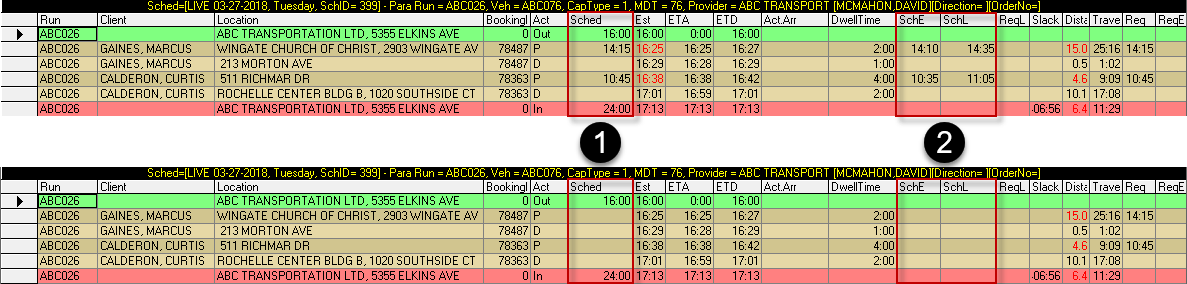
- 1
- All Schedule (Sched) times, except those of non-trip events, are removed when Planning Mode is used.
- 2
- Schedule Early (SchE) and Schedule Late (SchL) times are removed when Planning Mode is used.