
Cancel Prepayment Types
Define Fare Types before creating Cancel Prepayment Types.
Client Registration is designed to allow prepayment faring for a client. The feature is enabled when the Enable Prepaid Faring Deduction system property (found in , on the Profile tab, under Faring) is set to Yes. Once money is deposited into the client’s account, fares are automatically deducted when new bookings are created.
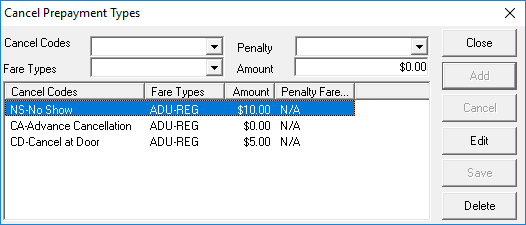
If a trip is canceled, based on the type of cancellation as well as the fare type of the client, the Cancel Prepayment Types ancillary data dialog box allows you to determine what happens to the fare tendered when a booking is canceled.
The system does not allow you to define an adjustment amount for the U code (Uncancel). When you use this code to reverse a previous cancellation, the adjustment is also reversed, the booking is still valid, and the client is charged the original fare for the booking.
| Field | Description |
|---|---|
| Cancel Codes | Click the appropriate cancel code. Cancel codes are defined in Schedule Status Codes ancillary data. If no options appear on the Cancel Code list, contact Trapeze Customer Care for assistance. |
| Fare Types | Click the applicable fare type that is refunded when a client cancels a trip
with the selected cancellation code. Fare types are defined in Fare Types ancillary data. |
| Penalty | Fare type used as the amount to charge the client for canceling the trip. If
no penalty is to be charged due to a cancellation, leave this field blank. The Penalty list is best for calculating complex faring penalties (for example, related to zones). |
| Amount | The amount that serves as an additional or alternative penalty charge. Type
0 if there is no additional penalty amount to be
charged. The Penalty list is best for calculating complex faring penalties (for example, related to zones). |
Examples
- Example 1: The policy at a site allots a full refund for an Advance Cancellation (the Cancel Code).
- Leave the Amount field at 0. The system automatically deposits the full fare back into the account for any trip marked as an Advance Cancellation.
- Example 2: A client is charged $1.00 for a Same Day Cancel (CS).
- In the Amount field type 1. When a trip is marked as Same Day Cancel, the fare previously deducted is automatically refunded to the client account and $1.00 is subtracted from the client account.