
Copying Waits and Travels
You can copy waits and travels from another sign-up period and service group.
-
In the Travels screen, click .
The Copy Waits and Travels dialog appears.
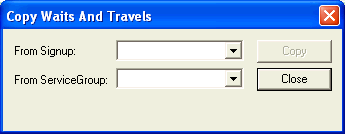
The options shown in the drop-down lists only show those from the agency in the current context.
- From the From Signup list, select the sign-up period from which you want to copy waits and travels.
-
From the From ServiceGroup list,
select the service
group from which
you want to copy waits
and travels.
Only options from the current agency in the context are shown in the lists. BlockBuster does not support copying from a different agency, that is, not the same agency as the one in the context.
- Click Copy.