The Line Statistics report provides summary revenue and non-revenue time and distance
statistics of selected lines by service and sign-up period. This is similar to the Hours and
Miles report but has less detail and uses a different format.
Note: The Revenue totals are affected by the Revenue flag set for each trip. If the flag is
not set, the revenue hours seem lower until the trips are corrected.
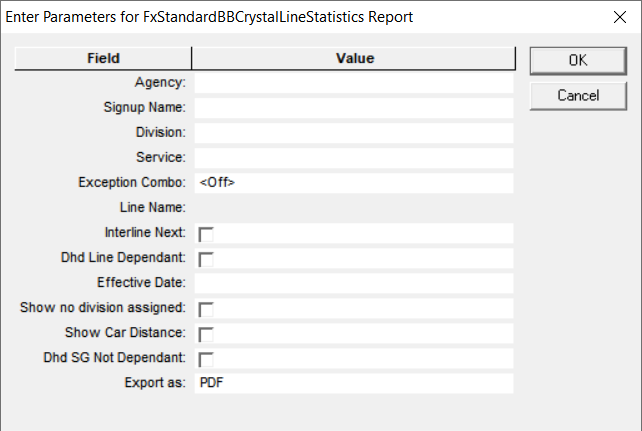
Parameter
Description
Agency
Agency code
Signup Name
Name of sign-up period.
Division
Division code
Service
Service abbreviation
Exception Combo
Selected exception combination. This is set to <Off> by default.
Line Name
Line number. This field is enabled after you select the Signup Name.
Interline Next
If selected, non-revenue time is assigned to the second line in the
deadhead.
Show no division assigned
If selected, the report includes statistics for the lines that have not been
assigned to a division.
Show Car Distance
If selected, trip distance is multiplied by the number of cars on the
rail.
Dhd Line Dependant
*If selected, deadheads are included using lines.
Dhd SG
Not Dependant
*If selected, deadheads are included without service groups.
Export As
Allows you to select the format type of the report:
CSV (Comma-separated values file that is read with spreadsheet program)
Excel (Microsoft spreadsheet)
PDF (Read with Adobe Reader)
RTF (Rich Text Format)
WORD (Microsoft Word)
* If applied,
the setting for this parameter should be the same for all your
reports.
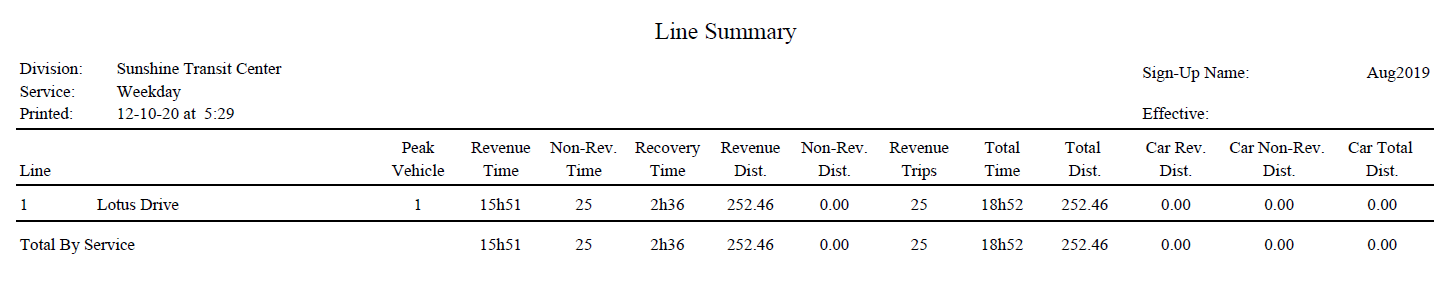
The following graphic shows an example of a Line Statistics (labeled LineSummary) report: