Place text in quotation marks for exact match search results.
Copying Run Time Intervals
You can duplicate run time intervals for trips that have the same run times in the
opposite direction to produce more efficient work.
Copying saves you time and effort in:
Recreating a run time interval that has the same run times of a run time interval in the
opposite direction.
Updating your records if you made changes on existing run times which are similar to
those of a run time interval in the opposite direction.
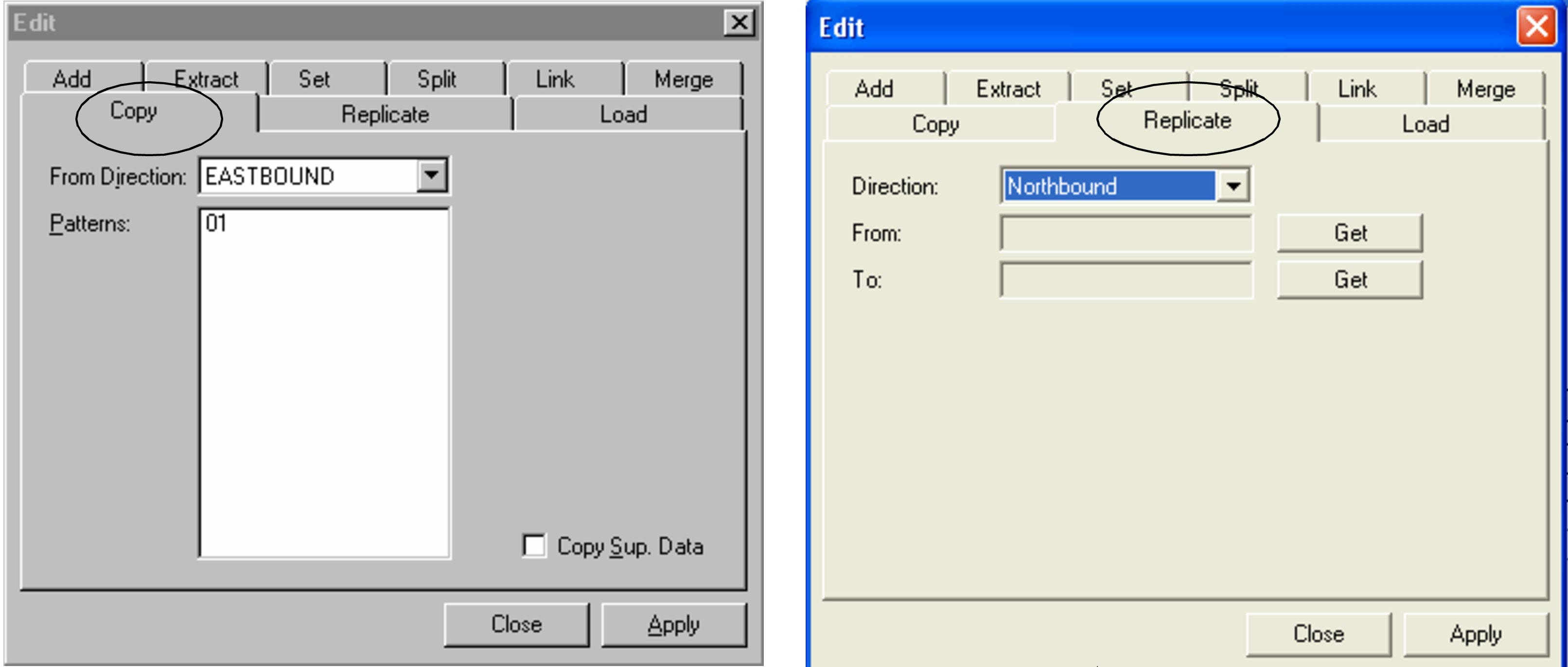
To copy run time intervals of patterns in the opposite direction, use the
Copy tab. The Copy tab is used to copy run
time intervals of patterns in the opposite direction. (See the left figure in the following
graphic.)
To copy run time intervals for patterns in the same direction, use the
Replicate tab. The Replicate tab is used to
copy run time intervals for patterns in the same direction. (See the right figure.)
On the Run Times grid, select the run time interval to which you want to copy.
Click Edit:
The Edit dialog box appears.
Select the Copy tab.
From the From Direction list, select the direction of the pattern from which you want to copy.
Press CTRL and select the patterns in the
Patterns frame to which you want to copy the run time
interval.
Optional: If there is any supplementary data associated with your original run time interval that
you also want to copy, click the Copy Sup. Data check box.
Click Apply.
A new run time interval with the same run times appears in the opposite grid on
the Run Times tab.