Place text in quotation marks for exact match search results.
Copying Run Times from Another Sign-up Period/Service
You can copy run times from another sign-up period or service.
From the Run Times tab, click Trip
BuildingCopy.
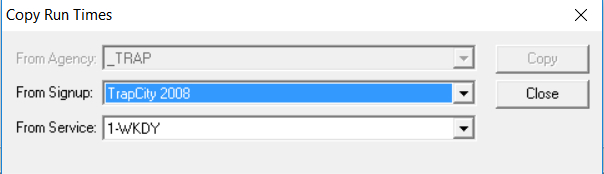
The Copy Run Times dialog box appears.
(If in a multi-agency environment) In the From Agency list, select
the appropriate agency. If not applicable, the field appears shaded.
Select the sign-up period and service from which you want to copy.
Click Copy.
The patterns and their associated run times appear in the Run
Times grids. If there are existing run times on the grids, a message asks you
to confirm if you want to delete them before the copy is performed.
Click Yes.
(If copying from another agency) A message also appears if a matching LineAbbr is
found, but its number of nodes does not match that of the target. You can modify your
selection or cancel the Copy.