You can copy time bands from one pattern to other patterns.
-
Click or right-click anywhere on the grids. From the right-click menu, select
Copy Time Bands.
The
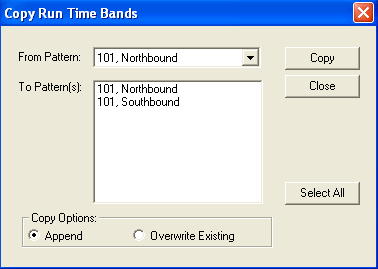
Copy Run Time Bands dialog box appears.
-
From the From Pattern list, select the pattern and direction
from which you want to copy time bands.
-
From the To Patterns list, click the pattern and direction to
which you want to copy the time bands.
Alternatively, to copy to all patterns, click Select All.
- Optional:
To add to or overwrite the existing time bands, apply one of the following
options:
- Append: Adds the time bands being copied to the existing time
bands of the selected patterns. This is the default. Duplicates are not added.
- Overwrite Existing: Overwrites the existing time bands.
-
Click Copy.
-
Click Close.
If the nodes in the selected patterns do not match, the time values on the
Run Times grid are shown with a question mark "?".
