
Place text in quotation marks for exact match search results.
Generating Exception Deadheads
This function automatically generates and updates missing interline deadheads for each
exception combination. It is only enabled if you have exception deadheads.
Note: This feature is activated when you are not using implied deadheads.
Click Blocking > Generate Exception Deadheads.
The Generate Exception Deadheads dialog box appears.
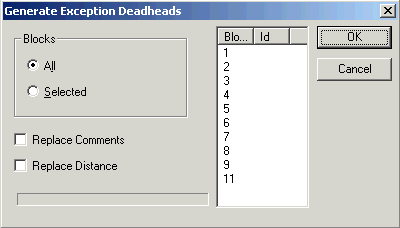
To generate exception deadheads for all blocks, select the All
option.
To generate exception deadheads for selected blocks, select the
Selected option, and then select the blocks that you want on the
right section of the dialog box.
Optional: To replace the existing comments and/or distances, select Replace
Comments and/or Replace Distances, accordingly.