Shifting allows you to increase
or decrease the deadhead times of selected deadheads.
-
On the Deadheads grid, click the row marker of the deadheads whose
times you want to shift.
-
On the Deadheads tab, click the Edit
button:
 .
.
The Edit dialog box appears.
-
Select the Shift tab.
The Ahead and All options are selected
by default.
-
In the Time field, type the number of minutes by which you want
to increase or decrease the deadhead times.
-
Do one of the following steps:
- To increase the deadhead times, leave the Ahead option
selected.
- To decrease the deadhead times, select the Back
option.
-
To apply the change to all deadheads on the grid, leave the All
option selected.
- Optional:
To apply the change only to the selected deadheads, select the
Selected option.
-
Click Apply.
The deadhead times of the selected deadheads are changed on the
grid.
-
Click Close.
After completing the shifting process, search the database to
make sure that the new deadhead times are applied to the affected nodes/garages in all the
related patterns. Perform a search using the Fr.Node and To
Node fields on the Deadheads tab.

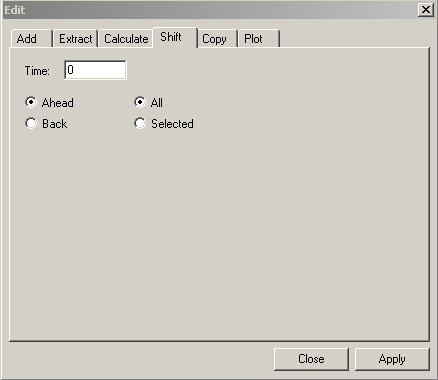 The Ahead and All options are selected by default.