Creating Pull-Out and Pull-In Garages
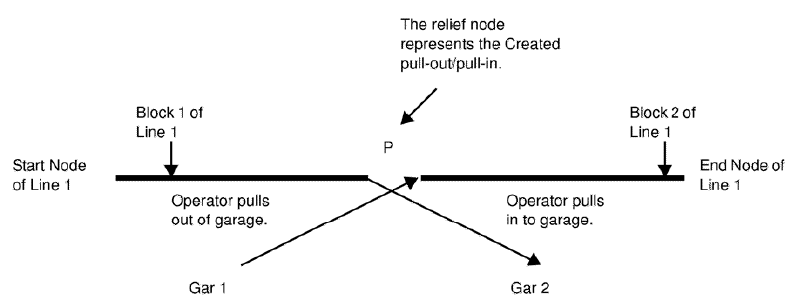
The nodes that are marked as Created Pull-Out and Pull-In Garages are relief points that are meant to provide a means of getting an operator from the garage to his or her assigned route and vice versa. These nodes are also meant to break up a long block.
The operator deadheads from Garage 1 to the relief node. From the node, he or she continues with Block 2 of Line 1. The operator of Block 1 deadheads to Garage 2 from the same relief node.
Another example of when created pull-outs and pull-ins are used is when there is a big block that may be 25 hours long. The block must be split up since the vehicle will need refueling at some point. Prior to runcutting, you must know how to break up the block, for example, the first block will be 18 hours long and the second block will be 7 hours long or vice versa. The block is split at the relief node. The operator of the first block deadheads from the relief node to the garage at the end of the first block. Another operator deadheads to the relief node for the second block.
-
After selecting a node in the Nodes tab, click .
The Edit dialog box appears.
- In the Label field of the Edit tab, type "P".
-
Click Apply.
The label appears in the Label field of the selected node in the Nodes tab.Note: The Use Created Pullouts and Pullins property must be selected to apply this feature. For more information on this feature, contact your Trapeze Customer Care representative.