
Viewing Run Times Based on PLAN Data
If you have the Trapeze PLAN, you can choose to display run times based on PLAN data for a given time band.
Note: Before performing this option, make sure that the ridership data for the trips being
viewed has been checked in PLAN and in the same sign-up period.
-
On the main menu, click Trip Building and choose one of the following options depending on the data that you want to view:
- Show PLAN Data Average - Displays the average values of the run times. The Setup PLAN Data Range option is added to the Trip Building menu.
- Show PLAN Data Median - Displays the median values of the run times.
Alternatively, right-click anywhere on the Run Times tab, and from the shortcut menu select one of these options.
A new row is added under the applicable pattern on the Run Times tab. The Pattern field shows Actual to indicate that the run times shown are based on the actual times extracted from the PLAN data. - Optional:
To view data over a specific time period, click the Setup PLAN Data
Range option in the Trip Building menu.
The PLAN Data Date Range dialog box appears.
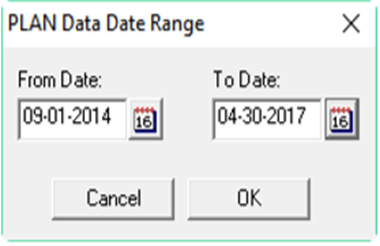
In the From Date and To Date fields, select the appropriate dates for the time period you want, then click OK.