
Creating Security User Accounts
Client Shell users can create security user accounts for active employees. Employees can then log in to ESS using a user name and password instead of a badge number and PIN.
- In the Client Shell, open the OPS Employee Security Management screen.
-
Set the Context (F3).
Context options for OPS Employee Security Management are Agency, Divisions, and employee Status Type.
-
Select the employees to include in the Employee Self-Service
Users security user group.
Users highlighted in red aren't currently active in the system and won't appear in security groups generated in this session.
-
Select Add Employee Self-Service Security Group Users:
 The system creates the Employee Self-Service Users security user group. A validation message appears to say which users are new group members. User IDs are created for employees who didn't have them before and employees with existing user IDs are added to the new group. If the system tries to create a new security user identity and an identity with the same name already exists in the system, an error message appears.
 -
To assign an existing security user profile to an employee:
-
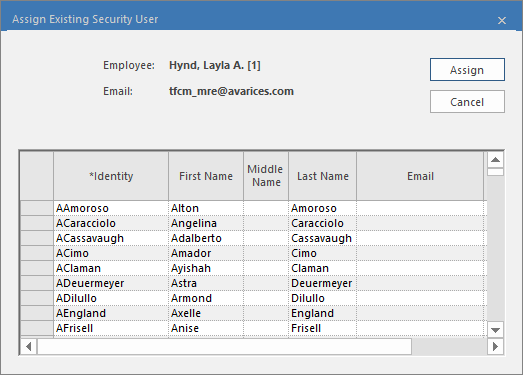
Select an employee and then select Assign Existing Security
User:
 The Assign Security User dialog appears.
 -
Select the existing security user Identity to use
and then Assign.
-
Select an employee and then select Assign Existing Security
User:
- Optional:
To remove a security user account from an employee, select the employee and
then Un-Assign Security User:
 Note:This removes access from the employee user. It doesn't remove the employee's security user account. If desired, remove the user account in the Security screen.
When needed, employees can be asked to reset their passwords.