
Contact Category
Contact categories allow contacts to be grouped by contact type (for example, location-based contacts), by category (for example, manager or road supervisor), and by facility (for example, individual providers or locations).
Multiple contact people can be defined for each facility, and those individuals can be associated with multiple contact methods.
Note: Before you can add contacts to a contact category, the contact category must exist in
system properties.
To add ancillary data, click .
| Field | Description |
|---|---|
| Name | Complete name or organization name of the contact, as it is specified in the Contact Category system property. |
| First Name | Contact's first name. |
| Last Name | Contact's last name. |
| Middle Init. | Contact's middle initial. |
| Comments | Any comments about the contact. |
| Address | Contact's address. Note: The address must be geocoded before the contact can be
added to a contact category. |
| JuristPoly | Jurisdiction polygon to which the contact belongs. |
| Category | Contact category to which to add the contact. Contact categories are a way of grouping contacts that have common attributes. Note: Contact category options are specified in , on the System tab,
in Contact Category, as comma-separated values. 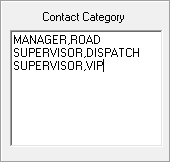 |
| Fax | Contact's fax number. |
| Phone | Contact's phone number. |
| Contact Type | Contact type: Funding Source, Provider, or Location. |
| Facility | Contact's facility. Facility options are dependent on the Contact Type. |
| Email Address | Contact's email address. |