
Creating Access Point Load Times Ancillary Data

Each service type caters to clients with various needs and load times.

About this task

Access point load times are separate from and in addition to ParaService Load times. When a group booking is made, each client marked for Bed, Curb, or Door service will be given the additional minutes. For example, if a group booking is set up for two clients who require curb service and the Curb load time is set for 8 minutes, an additional 16 minutes will be added to the trip.

Procedure

  1. Click File > Ancillary Data > Para > Service > Access Point Load Times.
    The Access Point Load/Unload Times dialog box appears.
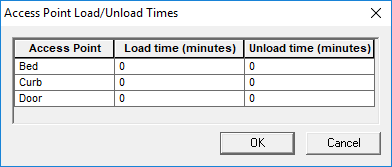
    The Access Point Load/Unload Times dialog box. Bed, Curb, and Door are available to be defined.
  2. Select the cell for the Load time or Unload time to be set.
  3. Type the new load or unload time (in minutes).
    To edit an access point load time or unload time, click the cell to be changed and then type the new value.
    To delete an access point load time or unload time, click the cell to be changed and then type 0.
  4. Click OK.