
Creating Shuttle Schedules
If your transit site provides shuttle service, you can create shuttle schedules using BlockBuster.
-
Click .
The Create Shuttle Schedule dialog appears.
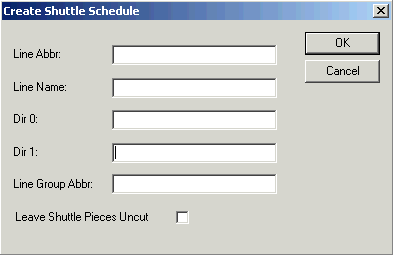
- Fill in all fields. Since the shuttles are not actual trips, you must type the information in the fields provided. Provide names for the line abbreviation and name that are different from those in your database to avoid duplication. You are prompted if the line abbreviation or name you typed already exists in the system.
- If you previously created a shuttle schedule for one service group of an existing line and then type the line abbreviation of the same line for a different service group and click the Line Name field, the other fields are automatically grayed out and filled in with the data of that line.
- To prevent the shuttle pieces from being cut, select the Leave Shuttle Pieces Uncut check box.
- Click OK.
The system creates all the associated trips, deadheads, blocks, and block pieces for each shuttle used in the system.