
Setting the Blocks View
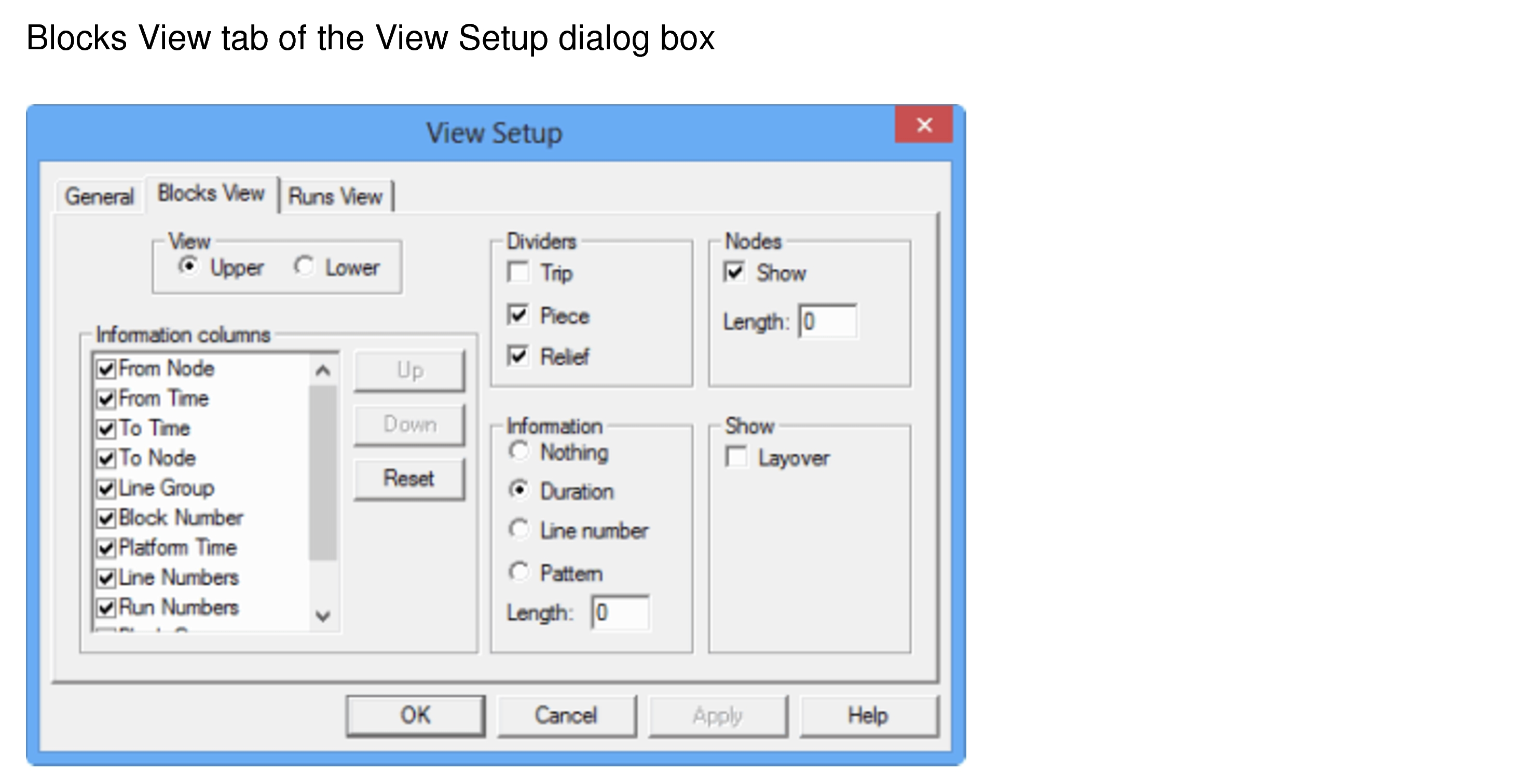
The View Setup dialog allows you to define how the blocks are displayed.
-
Click Graphical Runcutting > View
Setup.
The View Setup dialog appears.
-
On the Blocks View tab, set or select the appropriate attributes on the respective frames:
- View: Select where you want the Blocks view to be displayed by default: Upper (top), Lower (bottom). Information columns: Select the data that you want to view on the grids.
- Dividers: Select the component for which you want dividers - Trip, Piece or Relief.
- Nodes: Select the Show check box to display the Node names on the timelines. In the Length field, type the number of characters of the Node names that you want displayed.
- Information columns: Choose the piece of information that you want to display on the timeline. Click the Up and Down buttons to arrange the sequence of the columns. Click Reset to apply the sequence set as the default.
- Information : Select any of the following options:
- Duration
- Line number
- Pattern (In the Length field, type the number of characters of the pattern name you want displayed.)
- Nothing - No data is shown on the timeline except for the time in minutes.
- Show: Select the Layover check box. The layover is represented by a thin line in a color different from the pieces. If not selected, the layover is represented by a gap (space) on the timeline.
- Click Apply.
- Click OK.