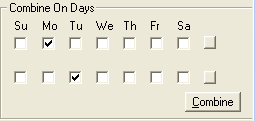
Put together runs on different days of the week.
-
In the Combine On Days frame on the Auto tab, select the
Monday check box on the first row and select the
Tuesday check box on the second row.
-
Click Combine.
-
Repeat step 1 with Tuesday and Wednesday. Select Tuesday
on the first row and Wednesday on the second row.
-
Click Combine.
-
Proceed with combining the days of the week in the proper sequence.
When the results appear on the Roster
screen, you can manually Edit the runs as necessary, for example,
make rosters legal, create off days, depending on your transit site
requirements.