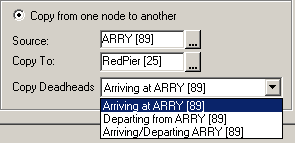
If you have existing data that can be used from an existing node, use the Copy option
in the Blocking menu.
-
In the Copy Deadheads dialog box, select the Copy from
one node to another check box.
-
In the Source field, do one of the following steps:
- Type a start or From node.
- Click the ellipsis button and from the list, select the node you want.
-
In the Copy To field, do one of the following steps:
- Type an end or To node.
- Click the ellipsis button and from the list, select the node you want.
-
In the Copy Deadheads drop-down list, click the appropriate
option: Arriving at (to or end node); Departing
from (from or start node); or Arriving/Departing
(both nodes).
-
If there are items that you do not want to copy, clear the appropriate
Copy check box on the right section of the dialog box.
-
Click Copy.
The records that match the data you entered are copied into the Deadheads
grid.
-
Click Close.