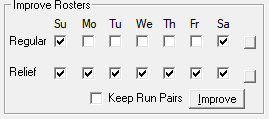
After automatic rostering is complete, you can develop more cost efficient rosters.
The Improve process operates only on rosters that have not been frozen. and whose Off
days have not yet been assigned.
The Improve Rosters frame has two rows of check boxes
under the days of the week with a square button beside each row. By default, for
Regular rosters, the Su (Sunday) and
Sa (Saturday) and check boxes are selected. For Relief
rosters, all the check boxes are selected.
Optional: Clicking on the button (on the right side of the check boxes) enables you to toggle
between having all the check boxes selected and having only the Su
(Sunday) and Sa (Saturday) check boxes selected.
Optional: To run the Improve, make sure that in the Regular row, only
Su and Sa check boxes are selected. Only
rosters in these days need to be improved. If you select any other day in this row, your
regular rosters will turn into Relief rosters.
In the Relief row, select all or any set of days.
To disallow run pairs to be split, select the Keep
Run Pairs check box.
Click Improve. If the Improve failed, try lowering the penalties
that you have entered in the Penalties dialog box and try the
Improve again.
To view the results of the Improve, click Rostering > Costing Summary or click Costing Summary: