Using OPS Payroll Comparison
The OPS Payroll Comparison screen lets you import payroll information and compare it with payroll information already in Trapeze OPS.
The system administrator must define the and properties.
-
Open the OPS Payroll Comparison screen and set the Context
(F3).
Context options for OPS Payroll Comparison are Agency and Division.
-
Import the payroll information to be compared with existing information:
-
Create an OPSClientPayroll.CSV or
OPSClientPayroll.TXT file (to match the
Import File Format property definition). Save
it to the defined Import File Location. For
example, C:\Trapeze\
When creating an import file, data should match the default order of the OPSClientPayrollImport table:
[empty],[TransactionDate],[TransactionTime],[LDate],[BadgeNum],[DivisionAbbr],[PayrollCode],[PayTime],[PayAmount]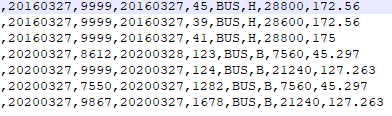 TransactionTime and PayTime are defined in seconds from midnight.
Files must be closed to be imported.
-
In the OPS Payroll Comparison screen, select
Import Client Payroll:
 Payroll records are imported to the OPS Client Payroll Import table and are visible on the OPS Client Payroll Import tab. Violations are marked in red.
To be imported without violations:- PayrollCode must reference a valid payroll code in the PayrollCodes table.
- DivisionAbbr must reference a valid division. Only records with a DivisionAbbr within the Agency/Division(s) selected in the Context will be imported.
- LDate, TransactionDate and TransactionTime must be valid date or time values.
- An employee can be uniquely identified from the provided BadgeNum and that employee exists in the specified division.
-
Create an OPSClientPayroll.CSV or
OPSClientPayroll.TXT file (to match the
Import File Format property definition). Save
it to the defined Import File Location. For
example, C:\Trapeze\
-
Run a payroll comparison:
Only records without violations will be processed.
-
Select Run Payroll Comparison:
 Processed records are selected in the Processed column.
-
Select the OPS Client Payroll Comparison tab to
show the imported data (OPSClientPayrollImport) and existing Timekeeping
records (TkPayInterface).

The Variance column indicates any differences in the data:
- None. The records are the same.
- PayTime. Difference in pay time.
- PayAmount. Difference in pay amount.
- Missing record. The record could not be found in one of the source tables (either OPS [TkPayInterface] or Legacy [OPSClientPayrollImport]).

-
Select Run Payroll Comparison:
-
Viewing comparison statistics:
-
Select Comparison Statistics:
 The Comparison Statistics dialog appears.
 -
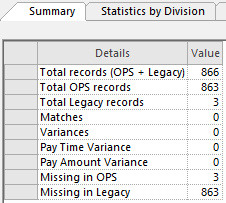
View statistics about the file import on the
Summary tab.
-
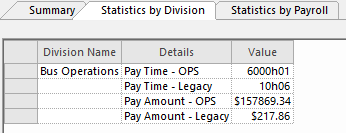
View divisional statistics on the Statistics by
Division tab.
-
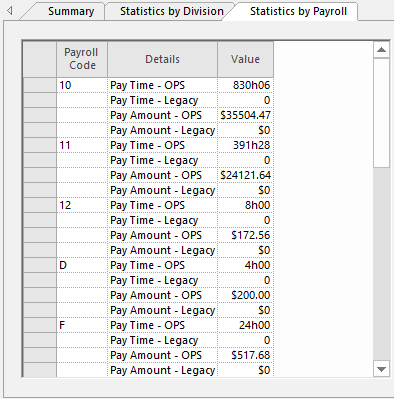
View payroll statistics on the Statistics by
Payroll tab.
-
Select Comparison Statistics:
- Optional:
Check the OPS Process Log:
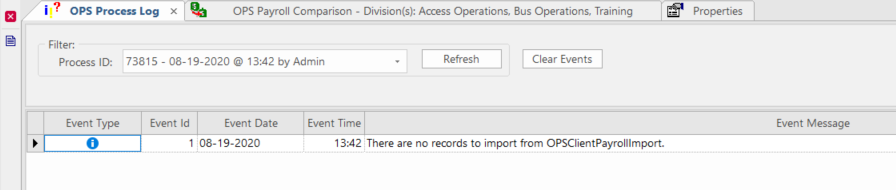
If you are having difficulty using the OPS Payroll Comparison screen, check the OPS Process Log for additional information.
- Select .
- Set the Context (F3).
- Choose the OPS Process OPS Client Payroll Tool and define the From Date and To Date.
- Select OK.
Log results appear.