
About the Timekeeping Screen
After timekeeping has been calculated, the Timekeeping screen shows activities for a selected day.
You can then verify timekeeping information and make any necessary adjustments.
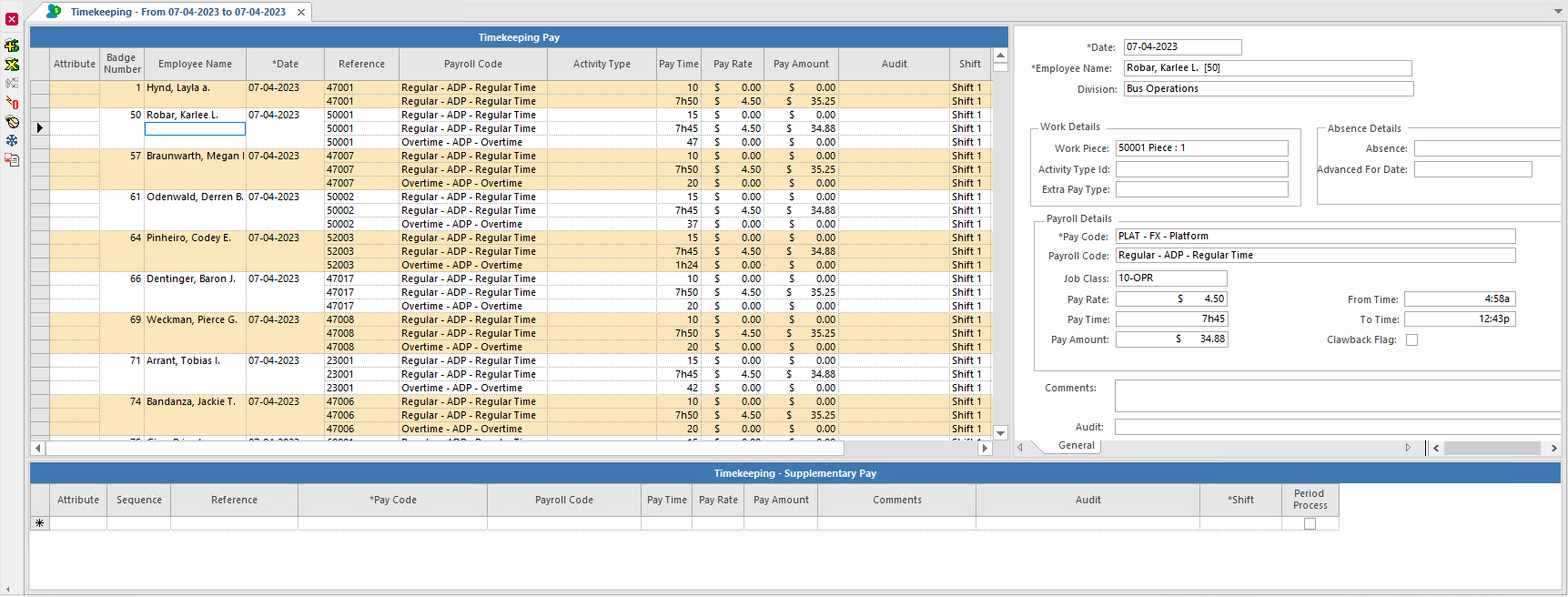
The Timekeeping screen has three panes.
| Pane | Description |
|---|---|
| Transaction | Lists timekeeping records. Each record includes the employee name, pay code, time
worked in the listed pay code, a pay rate, and a calculated pay amount. Each employee can
have multiple timekeeping records on a given day, depending on the type of work they
performed and the number of associated pay codes. Records include absence records that show
the absence abbreviation and time range, so you can determine the costs of absences for your
organization. By default, records are sorted by badge number, date, and employee name. Zebra striping is based on employee name and date. If you change the sort criteria, zebra striping adjusts to make the groupings easier to see. |
| Details | Shows detailed information about the record selected in the transaction pane and is used when adding pay for employees. |
| Adjustment | Lists all adjustments made to a timekeeping record. Adjustments can also be made in this pane if permissions are granted. |
| Button | Label | Description |
|---|---|---|
 |
Add Pay | Record extra pay for employees and record timekeeping transaction adjustments. |
 |
Reverse Transaction | Undo timekeeping transactions. |
 |
Cost Allocation | Allocate timekeeping record costs to different labor accounts. |
 |
Zero Pay Time | Reset all pay field values to 0 (zero). For example, it is used for unpaid absences, or when an operator volunteers to take no pay. |
 |
Show Employee Activity | View employee work assignments for employees shown in the Timekeeping screen. Depending on a system property setting, you can either view employee work assignments in the Employee Activity screen or in an Employee Activities dialog. |
 |
Freeze or Unfreeze Prior Pay Adjustment | Prevent adjustments to an employee's pay. |
Each transit agency sets policies about how to adjust timekeeping records. Typically, the
choices are the following:
- Reverse transactions and add pay.
- Make manual adjustments to records directly.