
About the Calculate Timekeeping Screen
The Calculate Timekeeping screen lets you apply your agency timekeeping calculation rules to the work completed on a specific day.
Calculating timekeeping is sometimes called costing work.
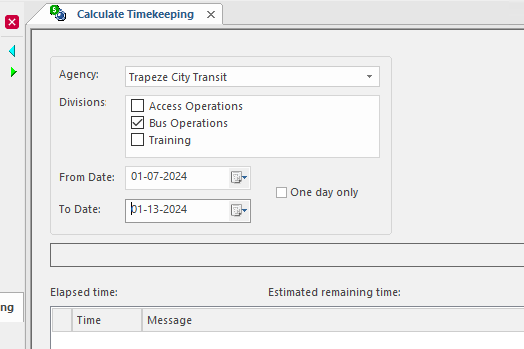
Trapeze OPS logs the processes that occur during timekeeping in the Cost Work log which you can view in the OPS Process Log screen.
For example, the log provides information to help determine when an individual employee has been re-costed. The log information adds trace messages in the forms re-cost employee [employee number xxxx] from [date] to [date] for date ranges and re-cost employee [employee number xxxx] on [date] for a single date.
Note: If your agency needs to change costing calculation methods, please contact your Trapeze
representative.
| Button | Label | Description |
|---|---|---|
 |
Perform Timekeeping Calculations | Starts timekeeping calculations. |
 |
Undo Timekeeping Calculations | Rolls back timekeeping calculations. |
Attention: A warning message appears if another user is calculating timekeeping for
the day or if timekeeping has already been calculated for the day for one or more
divisions.