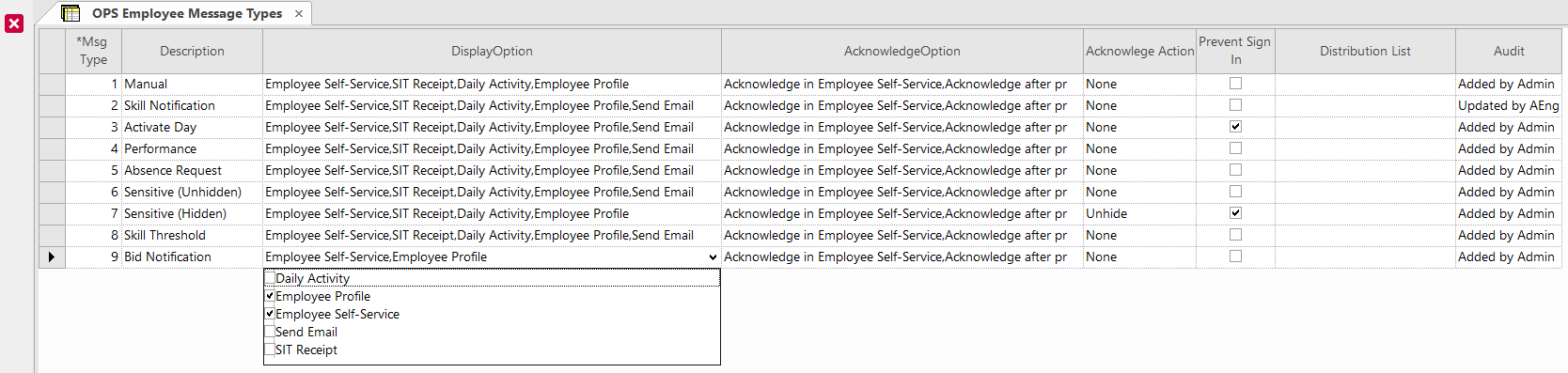
| Acknowledge Action |
How messages are treated after acknowledgment.Note: Users granted the correct
security permission keys can see sensitive (hidden) messages. |
| AcknowledgeOption |
When or where users can acknowledge messages. For example, after
printing. |
| Audit |
Audit information. |
| Description |
Not editable. Name of the message type (Msg Type).
- Manual. Manually created messages:
-
In the Daily Activity screen, by selecting the
Employee Messages ( ) or Send Mass Message ( ) or Send Mass Message ( ) options and creating or updating messages. ) options and creating or updating messages.
-
In the Extra Pay Management screen, when extra pay
claims are approved or denied, the following message is created and sent:
Extra pay claim for [reason] on [date] was
[Approved/Denied]
- Skill Notification. This is a historical message type
preserved when upgrading from a previous OPS
version using the OPS Upgrade Utilities screen.
Under
System Maintenance, the Update Message
Types for Employee Messages (Reference: OPS-13130) looks for
employee messages using the words expire, skill, or dormant and marks them
with the skill notification message type.
- Activate Day. Messages created and sent when the day is
activated (typically, using the Activate Day screen):
-
Absence alert messages, as defined in OPS Absence Alert
Types ancillary data.
There are separate Alert Message and
Employee Alert Message options for each
message.
- Missing required and optional work skills messages, as applicable based on
the and properties:
- Missing the required/optional skill(s) [skill]. Work [work name] will
be opened.
- Missing the required/optional skill(s) [skill]. Work [work name] will
be opened and absence(s) will be created for the duration of the
work.
- Missing the required/optional skill(s) [skill]. Work [work name] will
be preserved.
- Missing required and optional employee skills messages, as applicable
based on the and properties.
- Missing the required/optional employee skill(s) [skill]. All work for
the day will be opened.
- Missing the required/optional employee skill(s) [skill]. All work for
the day will be opened and a full-day absence created.
- Missing the required/optional employee skill(s) [skill]. Work
assignments will be preserved.
-
When employees require documentation to return to work (when
Absence Documentation is selected in the
Employee Profile - Employee Card screen) for
absence types that require back to work processing (as defined in the
Absence Types screen in the Return To
Work Flag field), the following message is sent:
Absence Documentation Required.
- Performance. Messages created and sent about employee
performance issues:
-
When an employee is late signing in using Sign-In Terminal,
as defined in the OPS Sign-In Terminal Parameters
screen, the following message is sent: Late for sign in. Please see
your Supervisor/Foreperson/Dispatcher.
-
Customized performance module messages. Contact your Trapeze
representative for more information.
- Absence Request. Messages related to absences:
-
When absence requests are granted, denied, or returned to a pending state
in the Absence Requests screen: Absence
request for [absence type] from [date] to [date] was granted/denied/is
pending
-
Absence alert messages sent when absences are created (not from Activate
Day), as defined in OPS Absence Alert Types ancillary
data.
There are separate Alert Message and
Employee Alert Message options for each
message.
- Message sent about how awarded bid work may affect future absences:
As a result of your recent bid, you now have [number] absence(s)
that may need to be changed. Please contact your supervisor.
- Sensitive (Unhidden). Requires customization.
- Sensitive (Hidden). Requires customization.
- Skill Threshold. Employee skill expiration messages:
- [skill] will expire in [number of] day(s).
- [skill] will expire tomorrow.
Messages are sent for skill types that have the Threshold
Message Flag and Expiration Flag selected
and an Expiration Threshold defined in the
OPS Skill Types ancillary data screen.
- Bid Notification. Messages related to bids:
|
| DisplayOption |
Screens and functions where messages are shown. For example,
Daily Activity. |
| Distribution List |
List of groups that will receive messages. Requires OPS Work Assignment Notifications. |
| Msg Type |
System-generated number assigned to the message type. |
| Prevent Sign In |
If selected, the operator won't be able to sign in when they're given the
message. |

 ) is selected, the following message is created and sent:
Your scheduled bidding time is [timeframe], [date] - [date] from
[time] to [time]. You have until this time to enter/modify your
choices.
) is selected, the following message is created and sent:
Your scheduled bidding time is [timeframe], [date] - [date] from
[time] to [time]. You have until this time to enter/modify your
choices.