
Employee Memos Configuration
System administrators use Employee Memos Configuration ancillary data to create different memo types and define their recipients.
Select the MemoTypes tab to define memo types by writing meaningful
descriptions. After creating new memo types, save the records.
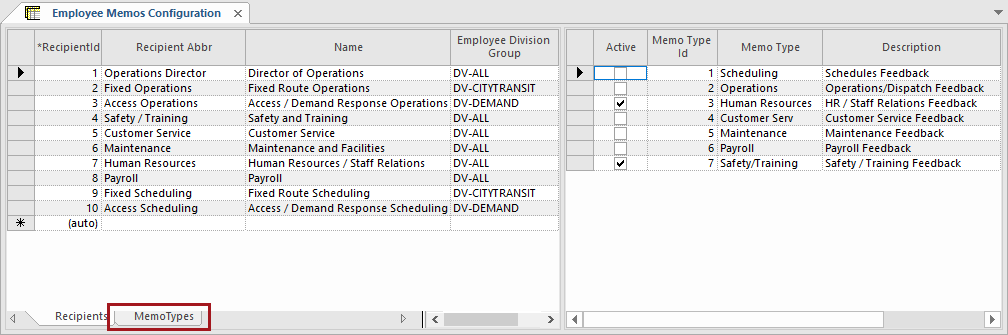
| Field | Description |
|---|---|
| Memo Type Id | Integer that uniquely identifies the memo type. |
| Memo Type | Memo type depending on intent or content of the memo. |
| Description | Description of the Memo Type. |
After creating memo types, define memo recipients and choose which memo types they can receive. Select the Recipients tab and create a record in the left pane. Save the record by clicking in the row marked with the asterisk. Then, add information to the right pane.
Recipients use the Employee Memos screen to respond to memos sent by employees.
| Field | Description |
|---|---|
| RecipientId | Integer that uniquely identifies the recipient of the memo. |
| Recipient Abbr | Abbreviation of the recipient name. |
| Name | Name of the recipient. |
| Employee Division Group | Divisions ancillary group allowed to send memos to the recipient. |
To save the record showing in the right pane, select the Save button in the screen toolbar.
| Field | Description |
|---|---|
| Active | Sets the memo types associated with the selected recipient. |
| Memo Type Id | Integer that uniquely identifies the memo type. |
| Memo Type | Name of the memo type. |
| Description | Description of the memo type. |