
Determining Provider Faring
Trip Booking contains a feature that shows the amount of money a provider would charge a site for an individual trip.
About this task
The
Provider Fares dialog box allows you to define how a chosen
provider’s cost of serving a trip is computed for Low Cost Provider determination.
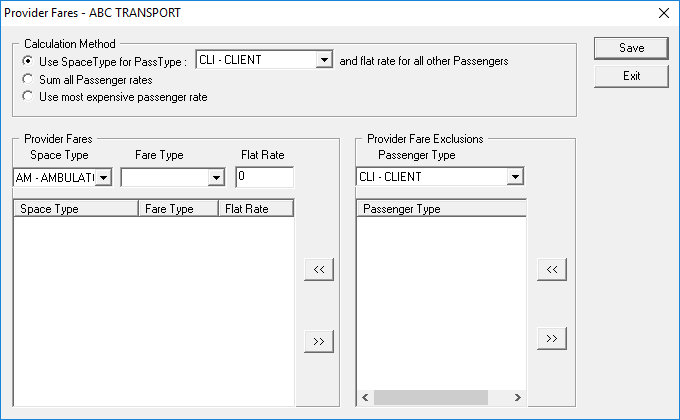
Provider rates vary among passengers, especially those who require a particular space type, such as a wheelchair. To accommodate fare calculation for varying passenger types, the Provider Fares dialog box is organized into Calculation Method, Provider Fares, and Provider Fares Exclusions areas.
The Calculation Method frame allows you to pick the type of calculation method to use when arriving at a fare amount.
The three calculation methods are as follows:
- Use SpaceType for PassType and flat rate for all other Passengers allows you to use a space type rate specified in the Fare Type field of the Provider Fares frame when the passenger type selected from the list is used in the booking. All other passenger types are charged the flat rate specified in the Provider Fares area.
- Sum all Passenger rates is used for clients who require a space type. This calculation method sums up the space type and passenger type rates into one total rate for the trip.
- Use most expensive passenger rate calculates the more expensive rate of a client’s space type rate and passenger type rate.
The Provider Fares frame allows you to define fare types for specific space types.
Procedure
- Do one of the following:
- Click .
- Click the Providers button:

The Providers ancillary screen appears.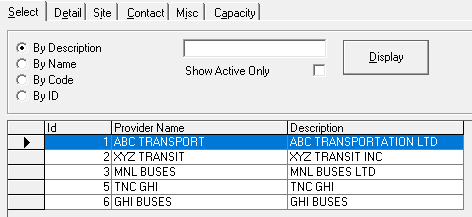
- On the Select tab, search for and select the provider.
- On the Misc tab, click the Faring button.
- In the Calculation Method frame, select a calculation method.
-
In the Provider Fares frame:
- In the Space Type list, click a space type.
- In the Fare Type list, click a fare type.
- In the Flat Rate field, type the flat rate in dollars.
-
To add a provider fare for a space type, click the double-left arrow button in the
Provider Fares frame:

- To define a passenger type to be excluded from paying fare, select an existing passenger type from the Passenger Type list, and then click the double-left arrow button in the Provider Fare Exclusions frame.
- Click Save.
-
To remove a provider fare for a space type, select the provider fare and click the
double-right arrow button in the Provider Fares frame:

- To remove a passenger type from the fare exclusion list, select the provider fare and click the double-right arrow button in the Provider Fare Exclusions frame.
- Click Save.
- Click Exit.