
Viewing Schedule Events
Viewing all scheduled events shows all pull-ins, pull-outs, breaks, pick-ups, and drop-offs on all runs for a live or template schedule.
Before you begin
About this task
Procedure
- Click the Options tab.
-
In the View All Events frame, select one or more filters.
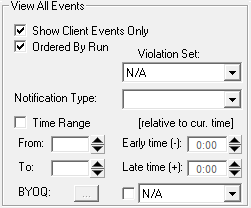
-
Do one of the following:
- Click the Display All Scheduled Events button:

- Click .
- Click the Display All Scheduled Events button: